The Best Free Adobe Acrobat Alternatives for Linux
The Best Free Adobe Acrobat Alternatives for Linux: Edit PDFs Like a Pro
- Apple’s Native Linux Container Tool Has Arrived — But Can It Really Replace Docker?
- 60% of MD5 Password Hashes Can Be Cracked in Under an Hour with a Single GPU
- Dirty Frag: Root Access on Every Major Linux Distribution — No Patch, No Warning
- Proton Mail: Data Transferred to FBI Again!
- How Close Are Quantum Computers to Breaking RSA-2048?
- What is the best alternative to Microsoft Office?
The Best Free Adobe Acrobat Alternatives for Linux: Edit PDFs Like a Pro
PDF editing on Linux has long been a challenge. While Adobe Acrobat remains the gold standard for professional PDF editing, it’s not available for Linux users.
Fortunately, several free and capable tools now offer similar functionality: from basic annotation to advanced text and image editing.
Below is an overview of the best free Linux software that most closely replicates Adobe Acrobat’s capabilities.
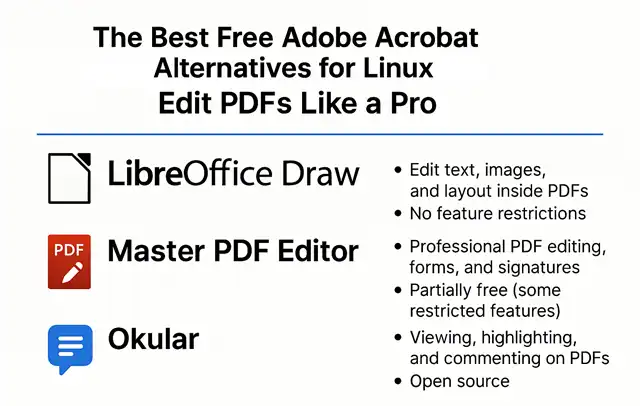
1. LibreOffice Draw — The Best Fully Free Option
Best for: Editing text, images, and layout inside PDFs.
License: Open Source (Free)
LibreOffice Draw, part of the LibreOffice suite, has evolved into one of the most practical PDF editors on Linux. It allows users to open PDF files directly, modify text and images, and then export them back to PDF. The interface is simple, familiar, and surprisingly powerful for an office suite tool.
Key features:
-
Edit or replace text and images directly within PDFs.
-
Add shapes, comments, and annotations.
-
Export edited files as high-quality PDFs.
-
100% open source — no feature restrictions or watermarks.
Limitations:
-
Complex layouts or embedded fonts may shift slightly after editing.
-
Not ideal for heavily formatted PDFs or scanned documents.
✅ Verdict: Perfect for most users who need light-to-moderate PDF editing without spending a cent.
2. Master PDF Editor — Closest to Adobe Acrobat (Partially Free)
Best for: Professional PDF editing, forms, and signatures.
License: Free for personal use (with some limitations)
Master PDF Editor by Code Industry is one of the most feature-complete PDF editors available for Linux. It supports text and image editing, annotations, digital signatures, form creation, and page reordering — nearly on par with Adobe Acrobat Pro.
Key features:
-
Full text and image editing inside PDFs.
-
Add, remove, or rearrange pages easily.
-
Create and edit interactive PDF forms.
-
Support for digital signatures and encryption.
Limitations:
-
The free version has some restricted features.
-
The UI is less modern compared to Acrobat.
-
Not open source.
✅ Verdict: The most powerful Acrobat-like tool for Linux. Great if you need advanced editing and don’t mind minor license restrictions.
3. Okular — Ideal for Annotation and Form Filling
Best for: Viewing, highlighting, and commenting on PDFs.
License: Open Source (KDE project)
Okular, the KDE PDF viewer, offers a clean interface with rich annotation features. It’s not designed for full content editing but is excellent for reviewing, highlighting, and filling out forms.
Key features:
-
Highlight, underline, and comment on PDF text.
-
Fill out and save interactive PDF forms.
-
Extract or reorder pages.
-
Lightweight and highly stable.
Limitations:
-
Cannot directly modify existing text or images.
-
More of a “PDF reviewer” than an “editor.”
✅ Verdict: Ideal for students, researchers, and anyone who primarily needs to annotate rather than rewrite PDFs.
Other Notable Mentions
-
PDF Arranger: Great for merging, splitting, and reordering PDF pages.
-
Xournal++: Perfect for handwriting or annotation with a stylus.
-
PDFsam Basic: Specializes in splitting and combining PDF files.
-
Inkscape: Can open single-page PDFs for graphic editing with vector precision.
| 🧩 Software | 🖊️ Edit Text & Images | 🗒️ Annotation | 🧾 Form Support | 🔍 OCR Capability | 🆓 Open Source | ⭐ Overall Similarity to Acrobat |
|---|---|---|---|---|---|---|
| LibreOffice Draw | ✅ Yes | ✅ Yes | ⚠️ Basic | ❌ No | ✅ Yes | ⭐⭐ Very Close |
| Master PDF Editor | ✅ Full | ✅ Full | ✅ Advanced | ⚠️ Partial (Paid) | ❌ No | ⭐⭐⭐ Closest |
| Okular | ❌ No | ✅ Excellent | ✅ Basic | ❌ No | ✅ Yes | ⭐ Moderate |
| PDF Arranger | ❌ No | ⚠️ Minimal | ❌ No | ❌ No | ✅ Yes | ⭐ Basic |
| Xournal++ | ❌ No | ✅ Handwriting & Notes | ❌ No | ❌ No | ✅ Yes | ⭐ Basic |
Remarks:
- ✅ Yes / Full / Advanced: Fully supported feature
- ⚠️ Basic / Partial: Limited or depends on use case
- ❌ No: Feature not supported
- ⭐ Rating: How close it feels to Adobe Acrobat overall
Conclusion
If you want a completely free, open-source solution, LibreOffice Draw is the most balanced and practical choice. It handles text and image editing well enough for most real-world needs.
If you require Acrobat-level features — like advanced forms, signatures, and precise layout editing — Master PDF Editor is your best bet, even with its limited free tier.
For lightweight annotation, Okular remains unmatched in speed, simplicity, and reliability.
In 2025, Linux users no longer need to envy Windows or macOS when it comes to PDF editing — the open-source ecosystem now offers tools that come remarkably close to Adobe Acrobat’s power and versatility.
The Best Free Video Editing Software for Linux OS
Replacing Microsoft Outlook on Linux: The Best Email Clients Compared
What is the best alternative to Microsoft Office?
The Best Free Photoshop Alternatives for Linux OS