Google Boosts Android Chrome with Third-Party Password Integration
Google Boosts Android Chrome with Third-Party Password Integration
- Why Enterprise RAID Rebuilding Succeeds Where Consumer Arrays Fail?
- Linus Torvalds Rejects MMC Subsystem Updates for Linux 7.0: “Complete Garbage”
- The Man Who Maintained Sudo for 30 Years Now Struggles to Fund the Work That Powers Millions of Servers
- How Close Are Quantum Computers to Breaking RSA-2048?
- Why Windows 10 Users Are Flocking to Zorin OS 18 Instead of Linux Mint?
- How to Prevent Ransomware Infection Risks?
- What is the best alternative to Microsoft Office?
Google Boosts Android Chrome with Third-Party Password Integration
Google is set to introduce a new credential feature for the Chrome browser on the Android platform, allowing integration with third-party password managers for automatic password filling.
This feature, in conjunction with the existing “autofill” functionality, aims to enhance the user experience when entering passwords.
Reportedly, the relevant content has appeared in “chrome://flags/#enable-autofill-virtual-view-structure” in Chrome 119. Once the feature is enabled, a new “autofill options” button appears in the settings of the Android platform’s Chrome browser. This button includes an option to allow third-party password managers to automatically fill in account passwords.
According to messages from X platform user Leopeva64, Chrome Dev is already able to fully run the new credential feature, and interested users can test it.
Google is introducing a new credential feature for the Chrome browser on the Android platform, allowing integration with third-party password managers.
Google is introducing a new credential feature for the Chrome browser on the Android platform, allowing integration with third-party password managers.
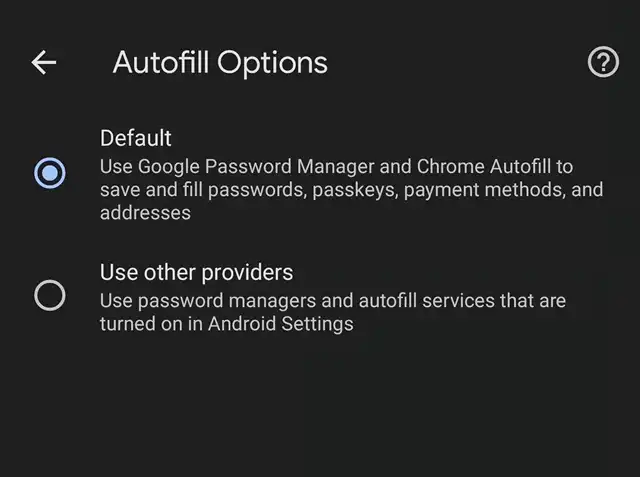
▲ Source: Leopeva64
androidcentral suggests that many current third-party password managers struggle to recognize when users interact with login pages. Google’s solution is to trigger the third-party manager to provide account password information only when the browser detects input fields. This makes the process more convenient to use. However, it is currently unknown when Google will integrate this feature into the stable version of the Chrome browser.



