How to connect an analog phone to IP PBX?
How to connect an analog phone to IP PBX?
- Why Enterprise RAID Rebuilding Succeeds Where Consumer Arrays Fail?
- Linus Torvalds Rejects MMC Subsystem Updates for Linux 7.0: “Complete Garbage”
- The Man Who Maintained Sudo for 30 Years Now Struggles to Fund the Work That Powers Millions of Servers
- How Close Are Quantum Computers to Breaking RSA-2048?
- Why Windows 10 Users Are Flocking to Zorin OS 18 Instead of Linux Mint?
- How to Prevent Ransomware Infection Risks?
- What is the best alternative to Microsoft Office?
How to connect an analog phone to IP PBX?
To connect an analog phone to an IP PBX, you need an Analog Telephone Adapter (ATA).
An ATA is a device that converts analog signals from a traditional phone to digital signals that can be transmitted over the internet using VoIP technology.
The ATA is then connected to the IP PBX as an extension.
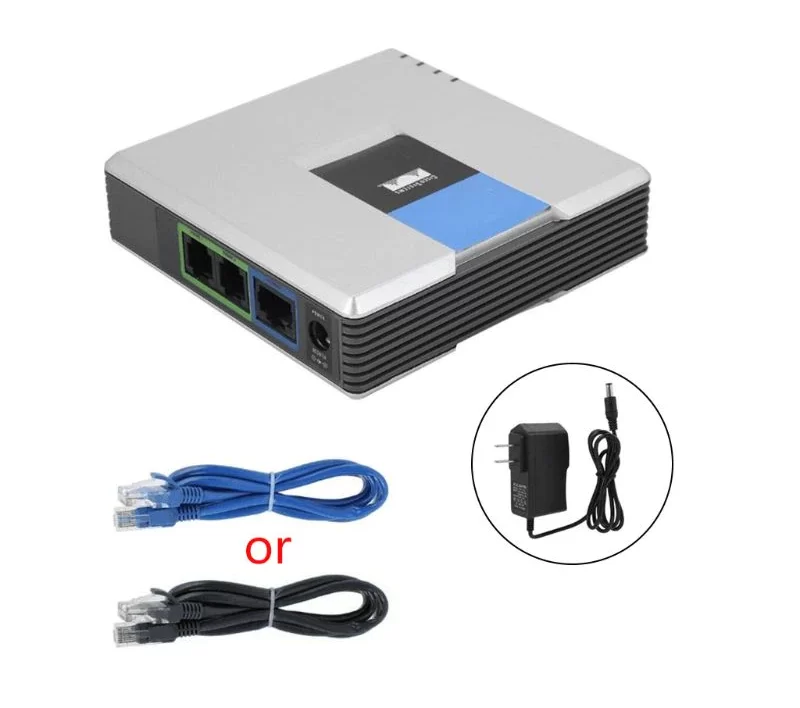
General steps to connect an analog phone to an IP PBX using an ATA:
-
Obtain an ATA device: Purchase an ATA device from a reputable vendor. There are many ATA devices available on the market, so choose one that is compatible with your IP PBX.
-
Connect the ATA device: Connect one end of a telephone cable to the phone port of the ATA device and the other end to the analog phone. Then, connect an Ethernet cable to the LAN port of the ATA device and the other end to a free Ethernet port on your network switch or router.
-
Configure the ATA device: Configure the ATA device by logging in to the web interface using a web browser. Enter the IP address of the ATA device in the web browser and log in using the default username and password. Configure the ATA device to register with the IP PBX as an extension.
-
Configure the IP PBX: Configure the IP PBX to recognize the ATA device as an extension. Add a new extension and enter the extension number and password.
-
Test the connection: Pick up the phone and dial the extension number. You should be able to make and receive calls using the analog phone.
Note that the specific steps may vary depending on the ATA device and IP PBX used.
It’s important to refer to the manufacturer’s documentation for detailed instructions.
What’s the difference on function between analog with ATA and IP phone?
On the other hand, an IP phone is a phone that is designed to work directly with an IP-based phone system, without the need for an ATA.
IP phones have built-in digital signal processing (DSP) capabilities, which allow them to convert voice signals into digital packets that can be transmitted over the IP network.
They also have an Ethernet port for connecting to the network and support for the SIP protocol for call signaling.
In terms of functionality, both analog phones with an ATA and IP phones can make and receive calls over an IP-based phone system.
However, IP phones generally offer more advanced features, such as support for multiple lines, call transfer, conference calling, voicemail, and more.
IP phones also tend to offer better call quality, as they are designed specifically for use with IP networks and do not require the extra conversion step that an ATA adds to the process.
What functions won’t analog phone with ATA have comparing to IP phone?
Analog phones connected through an ATA (Analog Telephone Adapter) generally have fewer features and functions compared to IP phones. Some of the features that may be missing in analog phones with ATA include:
-
Quality of Service (QoS) – IP phones can use QoS to prioritize voice traffic, ensuring that voice packets are delivered without delay or loss.
-
Encryption – IP phones can use encryption to secure voice traffic over the network.
-
Advanced call handling – IP phones can typically handle multiple lines and call appearances, allowing for features like call hold, transfer, and conference.
-
Integration with other systems – IP phones can integrate with other systems, such as voicemail, messaging, and contact management applications.
-
Remote management – IP phones can be remotely managed and configured, allowing for centralized administration and easier troubleshooting.
-
Presence and availability – IP phones can provide presence and availability information, allowing users to see the status of their contacts and colleagues.
Overall, IP phones offer greater flexibility and functionality compared to analog phones with ATA, but may be more expensive and require a higher level of technical expertise to set up and manage.
Free IP PBX solutions:
- Asterisk (FreePBX)
- Freeswitch (FusionPBX)
- SIPFoundry
- OpenSIPS
- Kamailio
How to Build an Enterprise-class Phone System?
How to Build IP-PBX on Raspberry Pi?



