Raspberry Pi 5 is not a good platform for VoIP server
Raspberry Pi 5 is not a good platform for VoIP server
- Why Enterprise RAID Rebuilding Succeeds Where Consumer Arrays Fail?
- Linus Torvalds Rejects MMC Subsystem Updates for Linux 7.0: “Complete Garbage”
- The Man Who Maintained Sudo for 30 Years Now Struggles to Fund the Work That Powers Millions of Servers
- How Close Are Quantum Computers to Breaking RSA-2048?
- Why Windows 10 Users Are Flocking to Zorin OS 18 Instead of Linux Mint?
- How to Prevent Ransomware Infection Risks?
- What is the best alternative to Microsoft Office?
Raspberry Pi 5 is not a good platform for VoIP server.
Four years after the release of the Raspberry Pi 4 , the Raspberry Pi Company has announced that the Raspberry Pi 5 will launch at the end of October.
Previously, Raspberry Pi CEO Eben Upton said in an interview that Raspberry Pi may not release Raspberry Pi 5 in 2023 due to the continued supply chain recovery.
According to the introduction, the Raspberry Pi 5 4GB model is priced at $60, and the 8GB version is priced at $80.
Compared to the Raspberry Pi 4, the Raspberry Pi 5 offers two to three times better CPU and GPU performance; approximately twice the memory and I/O bandwidth; and is the first Raspberry Pi computer to feature a chip designed in-house in Cambridge, UK.
Key features include:
- 2.4GHz quad-core 64-bit Arm Cortex-A76 CPU
- VideoCore VII GPU, supports OpenGL ES 3.1, Vulkan 1.2
- Dual 4Kp60 HDMI display outputs
- 4Kp60 HEVC decoder
- Dual-band 802.11ac Wi-Fi
- Bluetooth 5.0 / Bluetooth Low Energy (BLE)
- High-speed microSD card interface supporting SDR104 mode
- 2 USB 3.0 ports, supporting 5Gbps simultaneous operation
- 2 USB 2.0 ports
- Gigabit Ethernet with PoE+ support (requires separate PoE+ HAT, coming soon)
- 2 × 4-lane MIPI camera/display transceiver
- PCIe 2.0 x1 interface for fast peripherals
- Raspberry Pi standard 40-pin GPIO connector
- Real-time clock
- power button
New platform, new chipset
The three new chips are designed specifically for Raspberry Pi 5 programming.
BCM2712
The BCM2712 is Broadcom’s new 16nm applications processor (AP) derived from the 28nm BCM2711 AP that powers the Raspberry Pi 4 and features numerous architectural enhancements.
RP1
RP1 is an I/O controller for the Raspberry Pi 5. It is designed by the same team that provides the RP2040 microcontroller for Raspberry Pi, and like the RP2040, is implemented on TSMC’s mature 40LP process. RP1 has been in development since 2016 and is the longest-running, most complex, and (at $15 million) most expensive project ever undertaken on the Raspberry Pi.
DA9091
The BCM2712 and RP1 are supported by the third new component of the chipset, the Renesas DA9091 “Gilmour” power-management IC (PMIC). It integrates eight independent switch-mode power supplies to generate the various voltages required by the board, including a four-phase core supply capable of delivering 20 amps to power the Cortex-A76 cores and other digital logic in the BCM2712 . Like the BCM2712, the DA9091 is the result of many years of joint development.
Shape evolution
Visually, the Raspberry Pi 5 is very similar to its predecessor. However, while retaining the overall credit card-sized dimensions, the team also took the opportunity to update some design elements to accommodate the capabilities of the new chipset.
How much for a Raspberry Pi 5 including everthing necessary?
Let’s estimate the costs of 8GB version Raspberry Pi 5 in US dollar:
- 8GB Raspberr Pi 5 SOC: $80
- Plastic Case: $5 (assumed)
- Power Supply 27W: $15 (assumed)
- Heatsink: $10 (assumed)
- 128GB MicroSD card Endurance: $15
- Shipping: $22
Total: US$145 (Not so cheap)
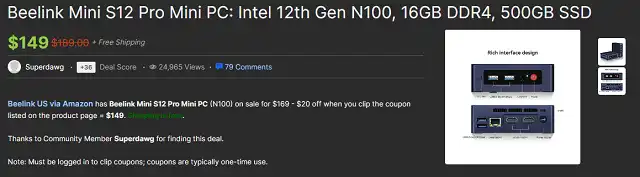
Let’s see a $149 mini PC with Free Shipping as a comparison:
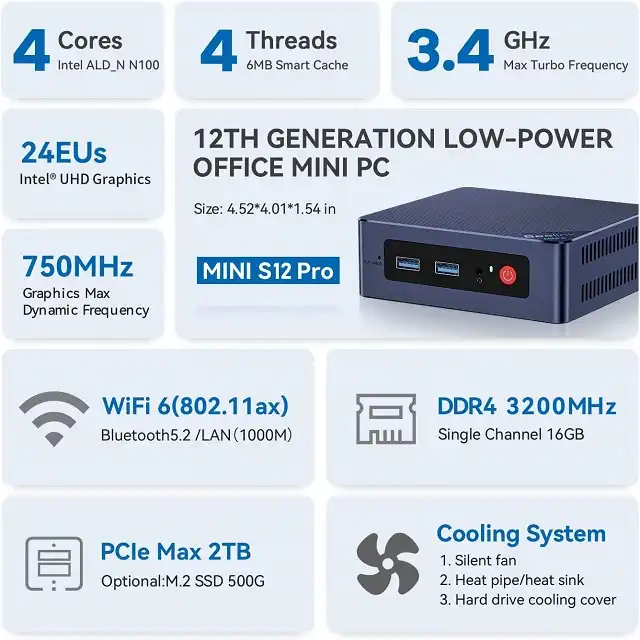
Beelink Mini S12 Pro Mini PC, Intel 12th Gen Alder Lake- N100(up to 3.4GHz), 16GB DDR4 RAM 500GB PCIe SSD, Desktop Computer Support 4K Dual Display/USB3.2/WiFi 6/BT5.2/Gigabit Ethernet
Specificationa:
- Intel 12th Gen Processor Alder Lake-N100 (4C/4T, 6M Cache, 0.8GHz to 3.4GHz)
- 16GB SO-DIMM DDR4
- 500GB M.2 PCIe X1 2280 Solid State Drive
- Intel UHD Graphics 750MHz
- Wi-Fi 6 (802.11ax), Bluetooth 5.2, Gigabit LAN
- Ports:
- 4x USB3.2 Gen2
- 2x HDMI
- 1x RJ45 Gigabit Ethernet
- 1x 3.5mm Audio Jack (HP&MIC)
- 1x DC Jack
- 1x CLR CMOS Reset
You can find that Raspberry Pi 5 has no siginifcant advantages on Costs and Performance.
The performance and Support of ARM-Architecture Processor is not on the same level as for x86 CPU
The performance and support of ARM architecture processors compared to x86 CPUs can vary depending on the specific use case and requirements.
It’s important to note that both ARM and x86 processors have their own strengths and weaknesses, and the choice between them often depends on the intended application. Here are some factors to consider:
-
Architecture Differences:
- ARM processors are designed with a focus on power efficiency and are commonly used in mobile devices, embedded systems, and low-power applications. In contrast, x86 processors, such as those from Intel and AMD, are traditionally used in desktops, laptops, and data center servers, where performance is a primary concern.
-
Instruction Set Architecture (ISA):
- ARM and x86 processors have different instruction set architectures, which can impact software compatibility and performance. x86 processors have a complex CISC (Complex Instruction Set Computer) architecture, while ARM processors typically use a RISC (Reduced Instruction Set Computer) architecture. The choice of ISA can affect how efficiently certain types of applications run on each platform.
-
Software Ecosystem:
- x86 processors have a long history in the desktop and server markets, which has led to a vast ecosystem of software and hardware support. Many software applications are optimized for x86 architecture, and this can result in better performance on x86 CPUs for certain workloads.
-
Performance Characteristics:
- For high-performance computing tasks like gaming, content creation, and data analysis, x86 processors have historically had an advantage due to their higher clock speeds, wider pipelines, and advanced instruction sets. However, ARM processors have made significant performance gains in recent years and are competitive in many scenarios, especially in power-efficient devices.
-
Customization and Integration:
- ARM processors are often used in custom SoC (System on Chip) designs, allowing for greater flexibility and integration of components. This can lead to optimized solutions for specific applications, such as mobile devices, IoT, and embedded systems.
-
Power Efficiency:
- ARM processors are known for their power efficiency, making them well-suited for battery-powered devices and energy-efficient data centers. In contrast, x86 processors tend to consume more power, which can be a concern in certain scenarios.
-
Support for Virtualization:
- x86 processors have historically had stronger support for virtualization technologies, making them a preferred choice for virtualized environments and data center deployments. However, ARM-based virtualization support has been improving.
In summary, the performance and support of ARM architecture processors compared to x86 CPUs depend on the specific requirements of the application.
While x86 processors have traditionally dominated in high-performance computing and server markets, ARM processors have gained ground in mobile devices, IoT, and other power-efficient applications.
The choice between ARM and x86 should be based on factors such as power efficiency, software compatibility, and the target workload.
FreePBX have no official image for ANY Raspberry Pi
FreePBX is an open-source VoIP (Voice over Internet Protocol) phone system that is primarily designed to run on Linux-based servers or virtual machines.
While FreePBX is a powerful and flexible platform for managing and configuring Asterisk-based phone systems, it may not provide official images for Raspberry Pi for several reasons:
1. Hardware Limitations:
Raspberry Pi is a single-board computer with limited processing power, memory, and I/O capabilities compared to traditional x86 servers or dedicated appliances. FreePBX may not officially support Raspberry Pi because it may not provide the level of performance and scalability needed for many business or production environments.
2. Optimization and Compatibility:
FreePBX may be optimized and thoroughly tested on specific hardware platforms to ensure performance, reliability, and compatibility. Creating an official image for Raspberry Pi would require additional effort in terms of optimizing the software for the hardware, which might not be a priority for the project.
3. Community Contributions:
Raspberry Pi enthusiasts and members of the FreePBX community may develop unofficial images and guides for running FreePBX on Raspberry Pi. These unofficial images and community-contributed resources can often be found on forums, blogs, and community websites.
4. Commercial Considerations:
FreePBX is also offered as part of commercial solutions and appliances by companies like Sangoma. These commercial offerings are typically designed for specific hardware and may not officially support Raspberry Pi.
5. Project Priorities:
The FreePBX project may prioritize development and support for more common and traditional server hardware architectures that are widely used in business and enterprise environments.
Sum up:
Although some people volunteer to offer free image of FreePBX, FusionPBX… for Raspberry Pi, but you have to face up many bugs in future.
Hence, a mini x86 PC is recommended for either commercial or personal purposes, also with better cost-efficiency and performance.
More details about Raspberry Pi 5 can be found in the official announcement .



