Raspberry Pi Imager 2.0 Launches with Comprehensive UI Overhaul
Raspberry Pi Imager 2.0 Launches with Comprehensive UI Overhaul
- Why Enterprise RAID Rebuilding Succeeds Where Consumer Arrays Fail?
- Linus Torvalds Rejects MMC Subsystem Updates for Linux 7.0: “Complete Garbage”
- The Man Who Maintained Sudo for 30 Years Now Struggles to Fund the Work That Powers Millions of Servers
- How Close Are Quantum Computers to Breaking RSA-2048?
- Why Windows 10 Users Are Flocking to Zorin OS 18 Instead of Linux Mint?
- How to Prevent Ransomware Infection Risks?
- What is the best alternative to Microsoft Office?
Raspberry Pi Imager 2.0 Launches with Comprehensive UI Overhaul
November 24, 2024 — Raspberry Pi has released version 2.0 of its official imaging tool, Raspberry Pi Imager, featuring a complete user interface redesign that makes the setup process more intuitive and accessible for users across multiple platforms.
The updated software, which supports Raspberry Pi OS, Windows, macOS, and Linux systems, represents a significant step forward in streamlining the process of preparing SD cards and storage media for Raspberry Pi devices.
OpenBSD 7.8 Released: Raspberry Pi 5 Support and Snapdragon X Elite Compatibility with AMD SEV Virtualization
Streamlined Workflow
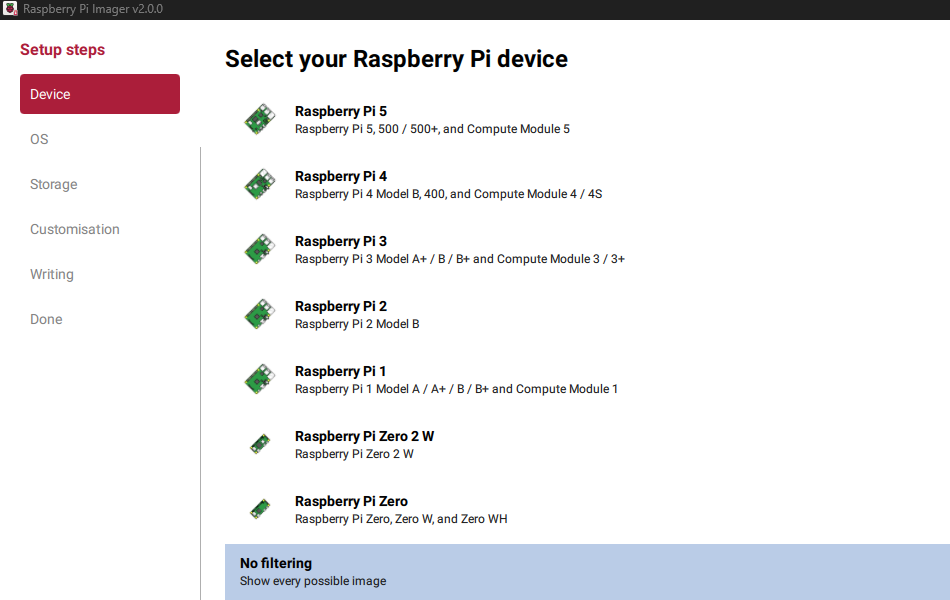
The new version reorganizes the entire setup process with improved clarity. Each step now occupies the full window, providing ample space for instructions, warning messages, and helpful links.
A redesigned guided wizard walks users through five key stages: selecting their Raspberry Pi device, choosing an operating system, selecting storage media, configuring system settings, and writing the image.
Raspberry Pi 5 vs. Mini PC with Intel N100 Processor
Integrated System Customization
One of the most notable improvements is the integration of system customization directly into the main imaging workflow.
Users can now configure essential settings—including username, regional language preferences, password, Wi-Fi credentials, SSH remote access, and port options—without navigating away from the primary interface.
This consolidation eliminates the need to access separate configuration menus, making the setup process more efficient.
Raspberry Pi 5 is not a good platform for VoIP server
Built-in Remote Access Support
Raspberry Pi Imager 2.0 incorporates Raspberry Pi Connect into the imaging process itself.
Users who log in during setup can automatically register their newly imaged system with their Connect account, enabling immediate remote desktop and SSH access once the device boots up.
This feature significantly reduces the steps needed to establish remote connectivity.
PBX on Raspberry Pi
Enhanced Accessibility
The update places strong emphasis on accessibility improvements. Version 2.0 now offers full keyboard navigation support and enhanced screen reader compatibility with improved labeling throughout the interface. The color contrast has been redesigned to improve visibility, while a new visual theme based on Raspberry Pi’s signature red includes increased whitespace, enhancing both visual clarity and readability for all users.
The Raspberry Pi Imager has become an essential tool for the millions of users in the Raspberry Pi ecosystem, from hobbyists and educators to professionals deploying embedded systems. This major update reflects the organization’s commitment to making computing accessible and user-friendly.
Raspberry Pi Imager 2.0 is available now as a free download from the official Raspberry Pi website for all supported platforms.