The Ghost in the Machine: Understanding Tiny XP in 2026
The Ghost in the Machine: Understanding Tiny XP in 2026
- Why Enterprise RAID Rebuilding Succeeds Where Consumer Arrays Fail?
- Linus Torvalds Rejects MMC Subsystem Updates for Linux 7.0: “Complete Garbage”
- The Man Who Maintained Sudo for 30 Years Now Struggles to Fund the Work That Powers Millions of Servers
- How Close Are Quantum Computers to Breaking RSA-2048?
- Why Windows 10 Users Are Flocking to Zorin OS 18 Instead of Linux Mint?
- How to Prevent Ransomware Infection Risks?
- What is the best alternative to Microsoft Office?
The Ghost in the Machine: Understanding Tiny XP in 2026
In the landscape of “retro-computing” and hardware optimization, few names evoke as much nostalgia and controversy as Tiny XP.
While the world has moved on to AI-integrated operating systems like Windows 11, a small pocket of enthusiasts continues to whisper about this ultra-lean, stripped-down version of a 25-year-old classic.
But what exactly is Tiny XP, and why is it considered a “digital minefield” in 2026?
The Most Windows-Friendly Linux Distributions for General Consumers: A Complete Guide
What is Tiny XP?
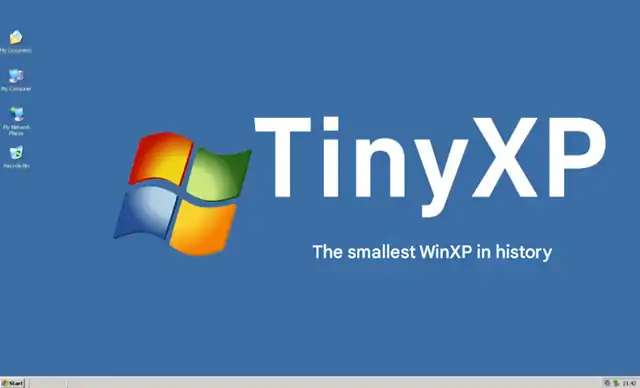
Tiny XP is an unofficial, community-modified version of Windows XP Professional. Created primarily by a developer known as “eXPer1ence,” it was designed using tools like nLite to aggressively “debloat” the original Microsoft OS.
By removing hundreds of components—including built-in drivers, help files, media samples, and even core system services—Tiny XP achieved a legendary footprint. Some versions, such as MicroXP, can fit into an ISO file smaller than 100MB and idle on as little as 40MB of RAM, making it a “miracle cure” for ancient Pentium III or early Atom-based hardware.
Zorin OS 18 Preview: A Windows 10 Replacement That Runs on 2GB RAM PCs
The 2026 Reality: Technical Limitations
While Tiny XP may feel “snappy” on old hardware, its utility in 2026 is severely bottlenecked by the evolution of the web:
-
The Browser Barrier: Standard 32-bit browsers have long abandoned XP. While community projects like Supermium (a modern Chromium backport) allow XP to render 2026-era websites, the lack of modern instruction sets (like AVX) in older CPUs often results in sluggish performance on JavaScript-heavy sites.
-
Security Protocol Mismatch: Tiny XP lacks native support for modern encryption standards like TLS 1.3. Without third-party patches, it cannot even establish a secure connection to a basic Gmail or banking login.
-
Hardware Incompatibility: Since the “Tiny” philosophy involves stripping out drivers, getting a modern Wi-Fi dongle or a USB 3.0 device to work on this OS is often an exercise in frustration.
Why Windows 10 Users Are Flocking to Zorin OS 18 Instead of Linux Mint?
Legal and Security Risks: A Warning
Using Tiny XP in a modern environment carries significant weight in terms of both legality and safety:
1. Legal Infringement
Tiny XP is not a licensed Microsoft product. It is a “distro” of pirated software. Even if you own a genuine Windows XP COA (Certificate of Authenticity), the act of distributing or using a modified version that bypasses activation and alters proprietary code violates Microsoft’s End User License Agreement (EULA). In a corporate or professional setting, using Tiny XP could lead to severe copyright audits and fines.
2. Cybersecurity Vulnerabilities
From a security standpoint, Tiny XP is a “house with no doors.”
-
Unpatched Exploits: It hasn’t received official security updates since 2014. Modern “Zero-Day” exploits targeting the NT kernel are often left wide open.
-
Malicious Origins: Because Tiny XP is distributed via unofficial mirrors and torrents, many versions have been found to contain pre-installed rootkits, keyloggers, or backdoors embedded by the modders.
-
No Modern Defense: 2026-era antivirus software simply does not run on 32-bit XP, leaving the system completely exposed to botnets that specifically scan for legacy “zombie” machines.
Why Windows 10 Users Are Flocking to Zorin OS 18 Instead of Linux Mint?
What web browser can be used in TinyXP?
In 2026, the standard browsers you know (Chrome, Edge, Firefox) cannot run on Tiny XP because they require modern system files and 64-bit architecture that XP simply doesn’t have.
However, a dedicated community of “retro-tech” developers has created several specialized browsers that allow Tiny XP to access modern websites like YouTube, Gmail, and GitHub.
1. Supermium (Recommended)
This is currently the “king” of XP browsers. It is a fork of modern Chromium (the same engine as Google Chrome) but modified to run on legacy systems.
-
Why it works: It includes backported security libraries and supports modern web standards (TLS 1.3).
-
Performance: It can open almost any modern website, though it might be heavy for a machine with less than 1GB of RAM.
-
Support: It even supports Google Sync, allowing you to sync your bookmarks from your main PC.
2. Mypal68
If you prefer the feel of Firefox, Mypal68 is the best choice.
-
Why it works: It is based on the Firefox 68 “Quantum” engine, which is much newer than the last official Firefox for XP (version 52).
-
Performance: Generally feels “lighter” and faster on CPU-limited machines compared to Supermium.
-
Compatibility: It handles most modern JavaScript well, though a few very complex sites might struggle.
3. K-Meleon (Goanna Edition)
The “lightweight champion” for extremely old hardware.
-
Why it works: It uses the Goanna engine (a fork of Firefox’s old Gecko engine).
-
Performance: It uses incredibly little RAM. If your Tiny XP is running on a machine with only 256MB or 512MB of RAM, this is likely your only option.
-
Downside: Its interface is very old-fashioned and some modern “web apps” might not display correctly.
4. 360 Extreme Explorer (Modified)
A Chromium-based browser from China that was unofficially “cleaned” and modified by enthusiasts (like the ArcticFoxie versions) to remove bloat and spyware.
-
Pros: It is surprisingly fast and compatible with high-end video streaming.
-
Cons: Higher security concerns due to its third-party modification history.
Why is it difficult for viruses to “infect” Linux OS?
The Verdict
In 2026, Tiny XP remains a fascinating relic for offline hobbyists who want to run legacy industrial software or play early 2000s games. However, for any task involving the internet or sensitive data, it is a liability.
For those seeking a “Windows-like” experience on old hardware without the legal and security headaches, lightweight Linux distributions—such as Lubuntu or Zorin OS Lite—provide a faster, safer, and entirely legal path forward.