What’s new in .NET 8.0?
What’s new in .NET 8.0?
- Why Enterprise RAID Rebuilding Succeeds Where Consumer Arrays Fail?
- Linus Torvalds Rejects MMC Subsystem Updates for Linux 7.0: “Complete Garbage”
- The Man Who Maintained Sudo for 30 Years Now Struggles to Fund the Work That Powers Millions of Servers
- How Close Are Quantum Computers to Breaking RSA-2048?
- Why Windows 10 Users Are Flocking to Zorin OS 18 Instead of Linux Mint?
- How to Prevent Ransomware Infection Risks?
- What is the best alternative to Microsoft Office?
What’s new in .NET 8.0?

1. Performance improvement
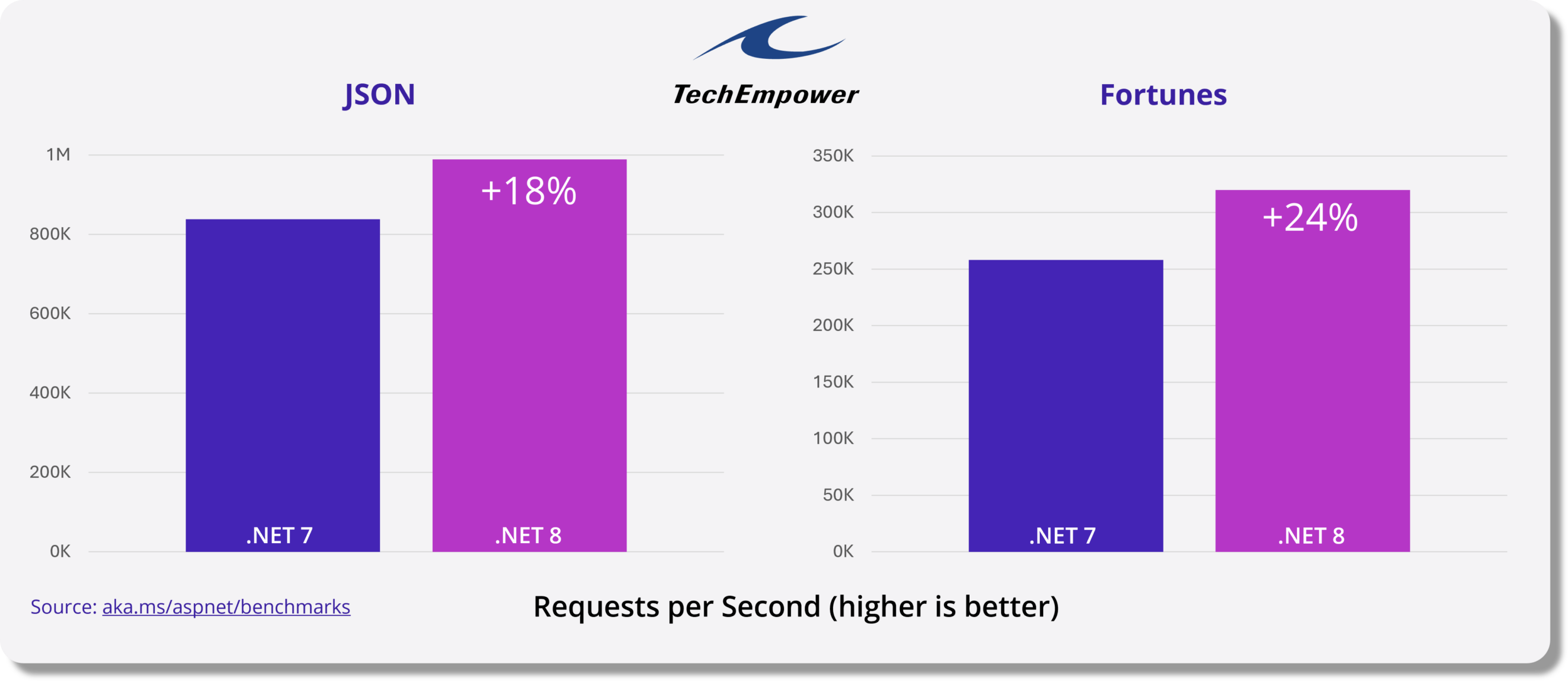
.NET 8 brings thousands of performance improvements across the stack .
A new code generator called Dynamic Profile Guided Optimization (PGO) is enabled by default, which optimizes code based on actual usage and can improve application performance by up to 20%.
The now supported AVX-512 instruction set is capable of performing parallel operations on 512-bit data vectors, which means more data can be processed in less time.
Primitive types (numbers and other types) now implement the new formatable and parsable interfaces, which enables them to be directly formatted and parsed to UTF-8 without any transcoding overhead.

2.NET Aspire
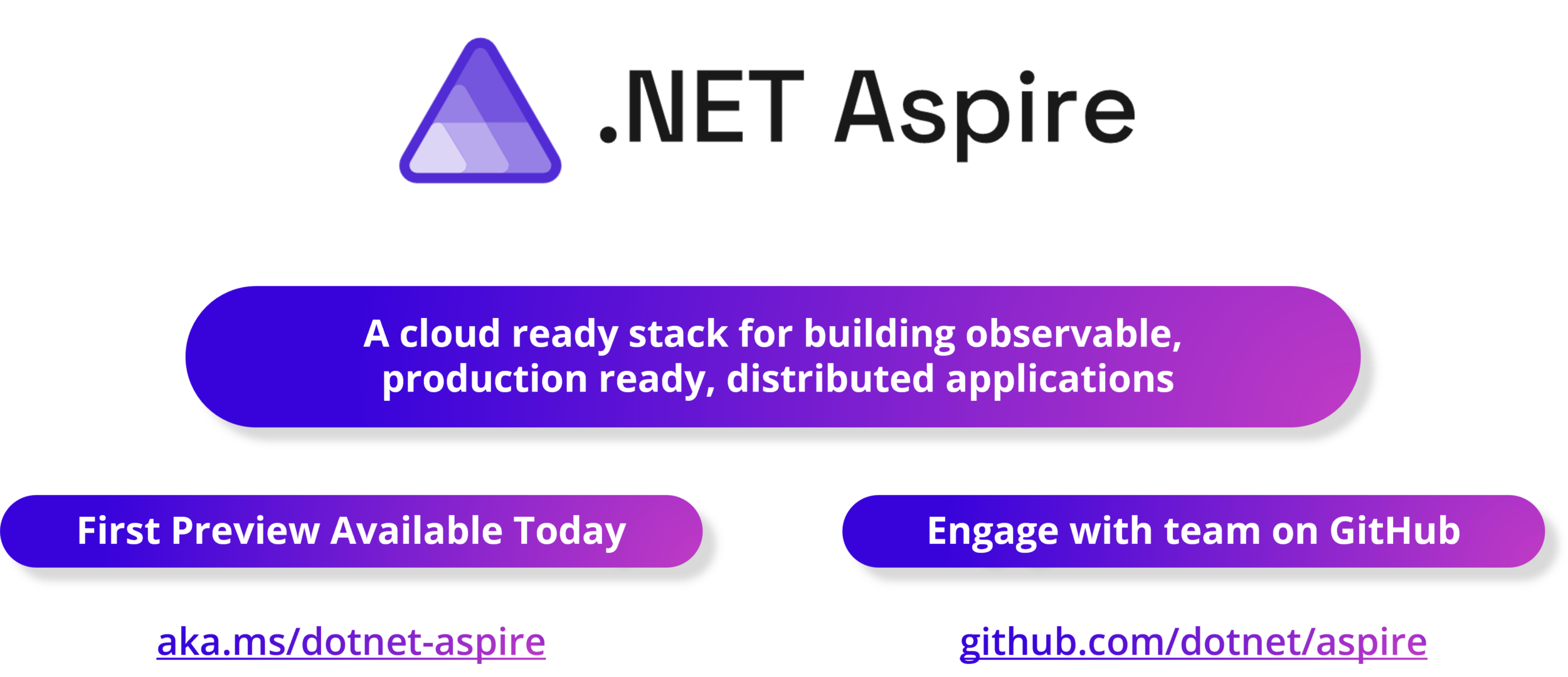
.NET Aspire is a stack for building elastic, observable, and configurable cloud-native applications using .NET. It includes a select set of components enhanced for cloud native, including telemetry, resiliency, configuration, and health checks by default. Combining a sophisticated yet simple native developer experience, .NET Aspire makes it easy to discover, obtain, and configure essential dependencies for cloud-native applications on day 1 and day 100.
3.NET 8 container enhancements – safer, more compact, more efficient
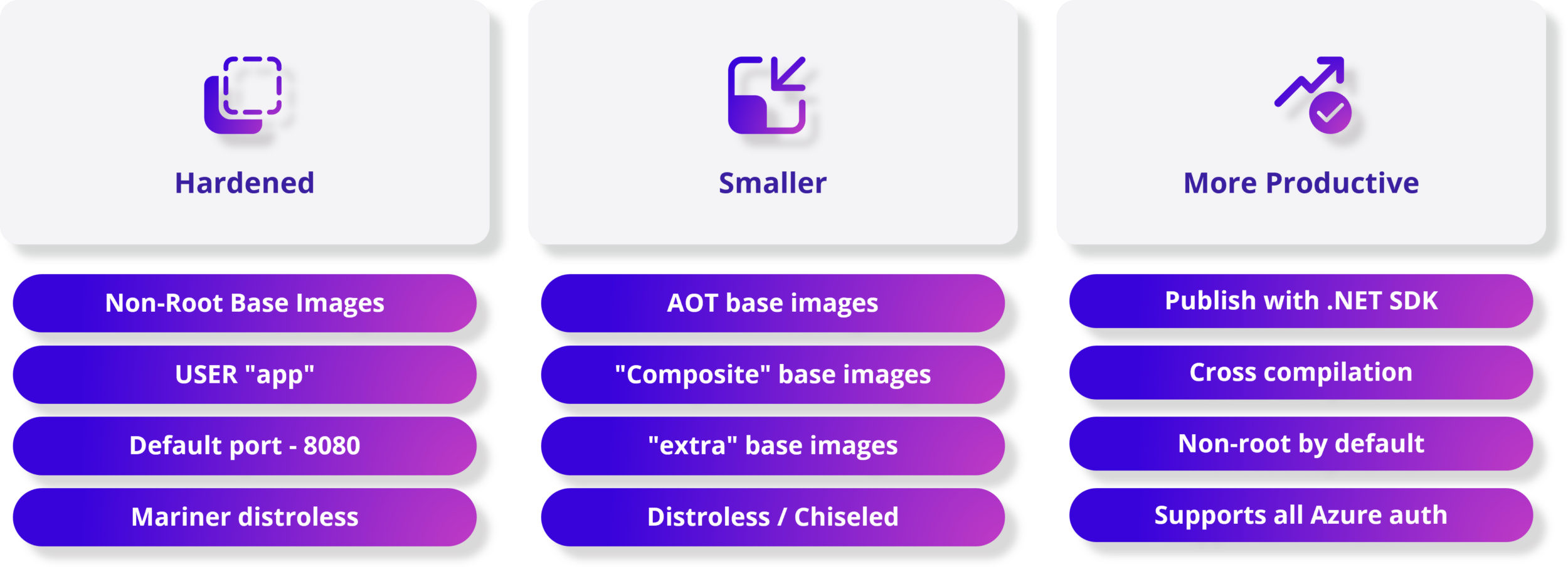
Packaging applications with containers is easier and more secure than ever with .NET . Each .NET image includes a non-root user, enabling more secure containers with a single line of configuration.
The .NET SDK tools can publish container images without a Dockerfile and are non-root by default.
Deploy containerized applications faster because .NET base images are smaller – including new experimental variants of our images that deliver truly minimal application sizes for native AOT.
Choose to use new Chiseled Ubuntu image variants for additional security hardening to further reduce your attack surface.
Build applications and container images for any architecture using Dockerfile or SDK tools.
4 Native AoT – The journey towards higher density sustainable computing
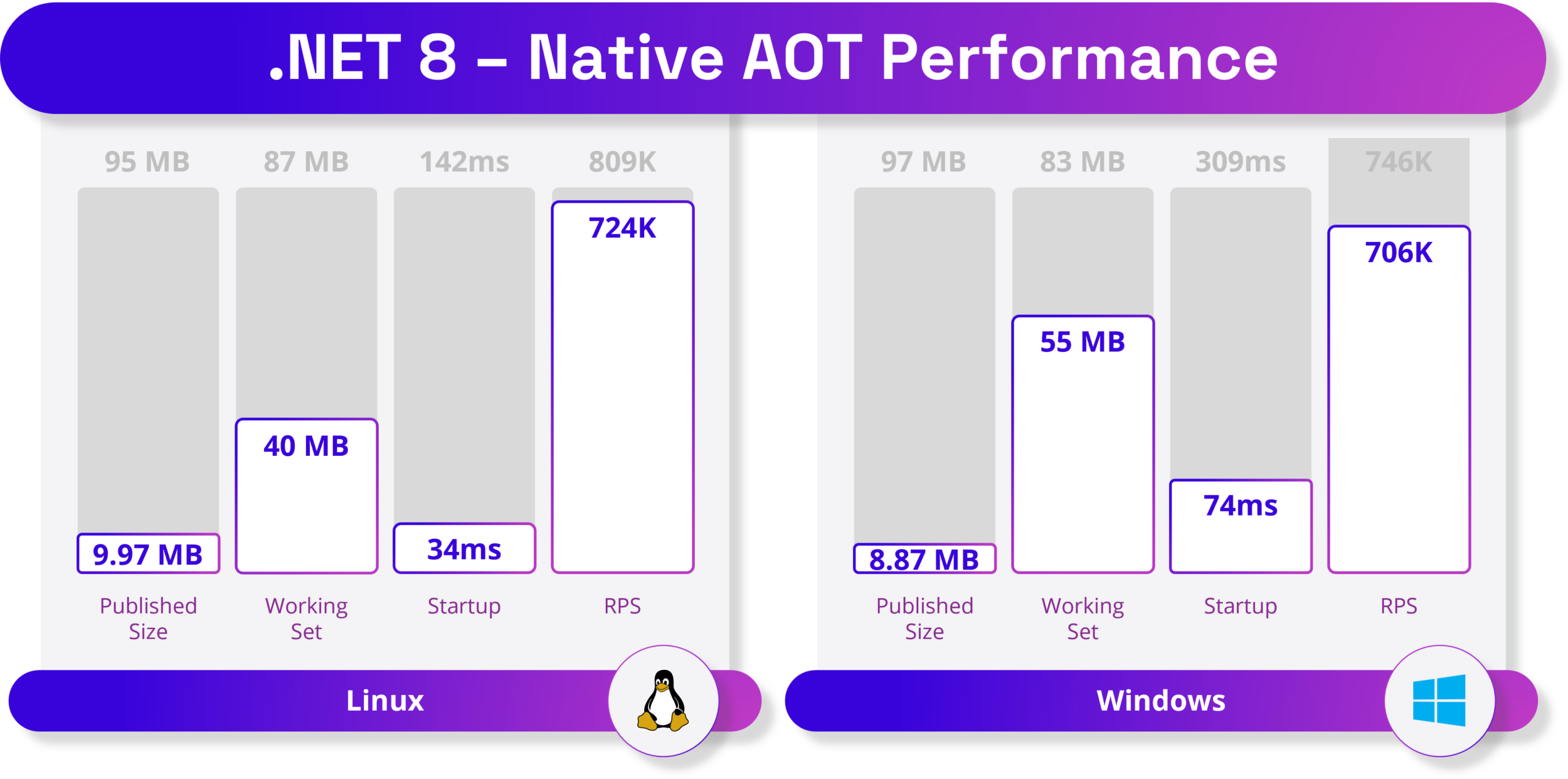
No need to wait for the JIT (just in time) compiler to compile the code at runtime.
No need to deploy JIT compiler and IL code. AOT applications deploy only the code required by the application.
Applications can now run in restricted environments that do not allow the use of JIT compilers.
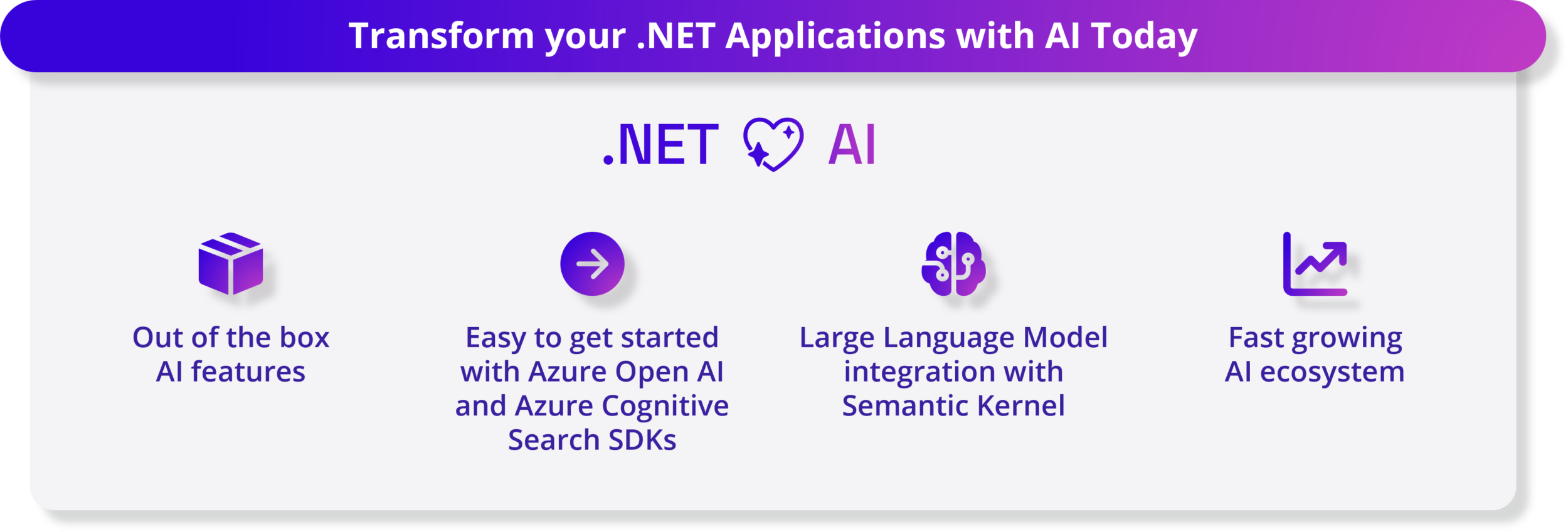
5 Artificial Intelligence – Integrate AI into your .NET applications
Generative AI and large language models are transforming the field of artificial intelligence, enabling developers to create unique AI experiences in their applications.
.NET 8 makes it easy to leverage AI with best-in-class out-of-the-box AI capabilities in the .NET SDK and seamless integration with multiple tools.
.NET 8 brings several enhancements to the library to improve its compatibility with generative AI workloads, such as integrating Tensor Primitives.
With the rise of AI applications, new tools and SDKs have emerged.
We work with numerous internal and external partners, such as Azure OpenAI, Azure Cognitive Search, Milvus, Qdrant, and Microsoft Teams, to ensure that .NET developers can easily access various AI models, services, and platforms through their respective SDKs.
Additionally, the open source Semantic Core SDK simplifies the integration of these AI components with new and existing applications to help you deliver innovative user experiences. System.Numerics
A variety of examples and reference templates are now available demonstrating patterns and practices to make it easy for developers to get started:
- Customer Chatbot
- Retrieval enhancement generation
- Develop applications using Azure AI services
6. Blazor – Build full-stack web applications using .NET
Blazor in .NET 8 can handle all your Web UI needs using both server and client side.
This is a full stack web UI! With multiple new enhancements focused on optimizing page load times, scalability, and improving user experience, developers can now use Blazor Server and Blazor WebAssembly in the same application, automatically moving users from server to client at runtime .
Thanks to the new “Jiterpreter”-based runtime and new built-in components, your .NET code runs significantly faster on WebAssembly.
As part of the overall enhancements to authentication, authorization, and identity management in .NET 8, Blazor now supports the generation of a complete Blazor-based identity UI.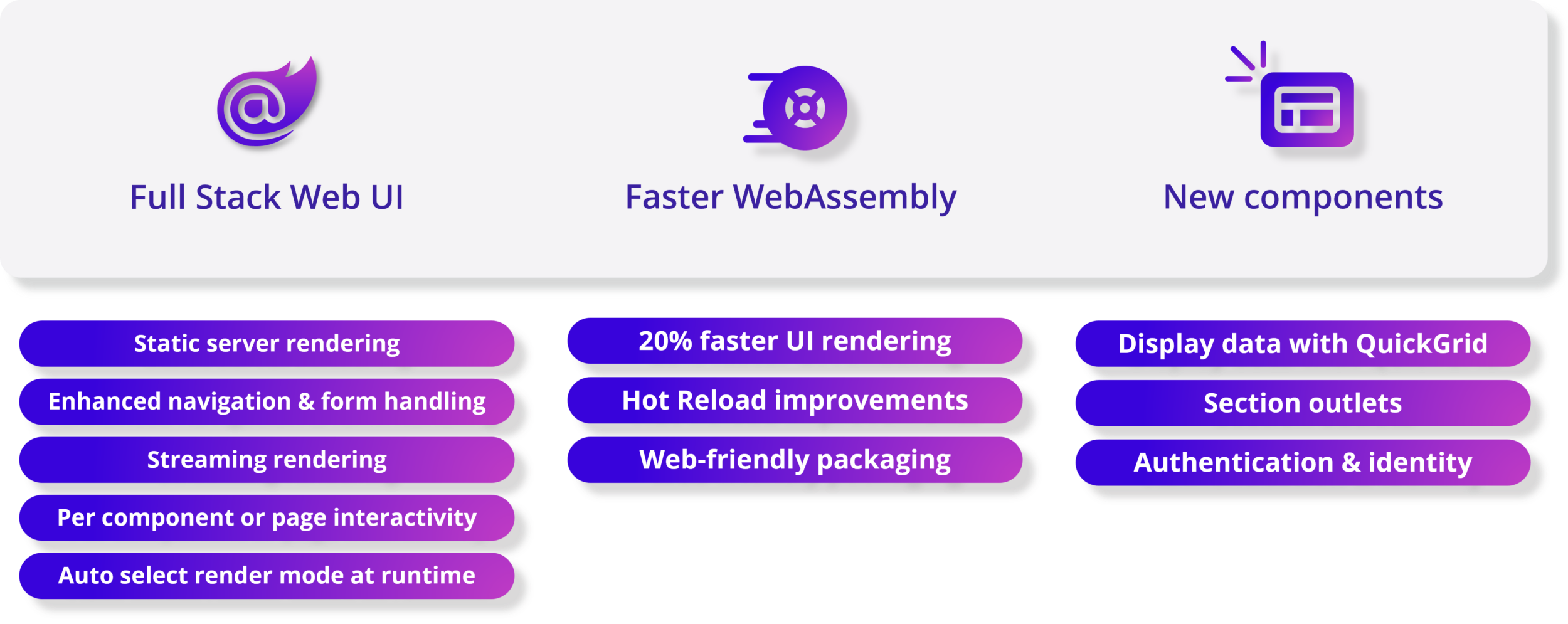
7.NET MAUI – Improving performance, reliability and developer experience
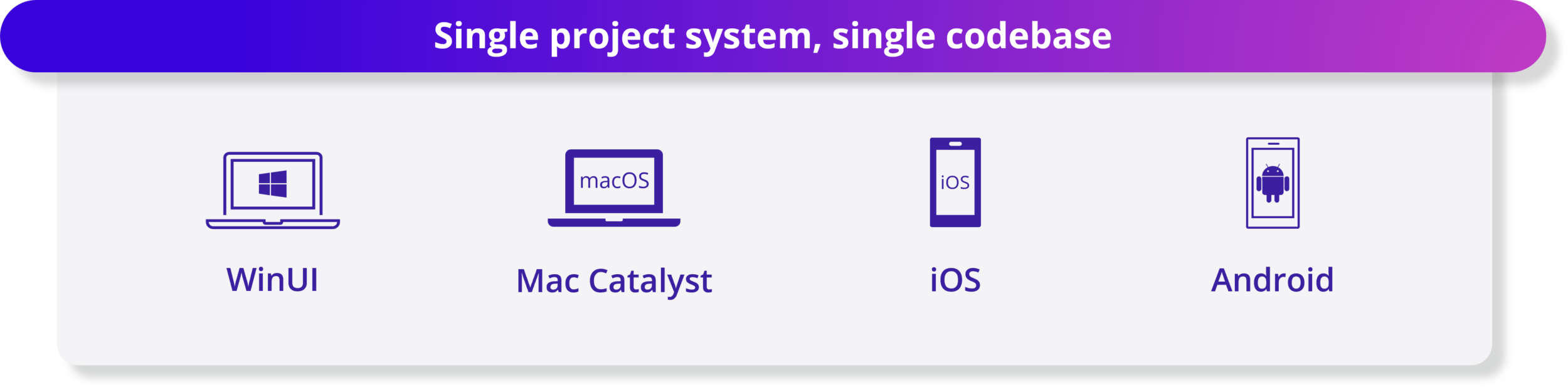
.NET MAUI provides a single project system and a single code base for building WinUI, Mac Catalyst, iOS and Android applications.
Native AOT (experimental) now supported for platforms like iOS.
The new Visual Studio Code extension for .NET MAUI gives you the tools you need to develop cross-platform .NET mobile and desktop applications.
Now supports Xcode 15 and Android API 34, allowing you to target the latest versions of iOS and Android.
There have been a number of quality improvements in performance, controls and UI elements, and platform-specific behavior, such as desktop interactions adding better click handling, keyboard listeners, and more.
8 C# 12 Features – Simplified syntax to improve developer productivity
C# 12 makes your coding experience more efficient and enjoyable. Now you can create primary constructor in any class and structure using simple and elegant syntax. No more boilerplate code to initialize your fields and properties. Take pleasure in creating arrays, spans, and other collection types using concise and expressive syntax. Use new default values for parameters in lambda expressions. No more overloads or null checks are needed to handle optional parameters. You can even use the usingalias directive to add aliases to any type, not just named types!
8.1 Set expressions
Before C# 12, creating collections required different syntaxes for different scenarios. Initialization requires a different syntax than or. Here are a few ways to create a collection: List<int>int [] Span<int>
int[] x1 = new int[] { 1, 2, 3, 4 };
int[] x2 = Array.Empty<int>();
WriteByteArray(new[] { (byte)1, (byte)2, (byte)3 });
List<int> x4 = new() { 1, 2, 3, 4 };
Span<DateTime> dates = stackalloc DateTime[] { GetDate(0), GetDate(1) };
WriteByteSpan(stackalloc[] { (byte)1, (byte)2, (byte)3 });
8.2 Primary constructor on any class or structure
C# 12 extends the primary constructor to work with all classes and structures, not just records. The primary constructor allows constructor parameters to be defined when declaring the class:
public class BankAccount(string accountID, string owner)
{
    public string AccountID { get; } = accountID;
    public string Owner { get; } = owner;

    public override string ToString() => $"Account ID: {AccountID}, Owner: {Owner}";
}
The most common uses of primary constructor parameters are:
- As an argument to the base() constructor call.
- Initialize member fields or properties.
- Reference constructor parameters in instance members.
- Remove boilerplate in dependency injection.
8.3 Alias any type
Alias types are a convenient way to remove complex type signatures from your code. Starting with C# 12, other types are available in alias directives. For example, these aliases are not valid in earlier versions of C#:
using intArray = int[]; // Array types.
using Point = (int x, int y);  // Tuple type
using unsafe ArrayPtr = int*;  // Pointer type (requires "unsafe")
8.4 Default lambda parameters
Starting in C# 12, you can declare default parameters in lambda expressions:
var IncrementBy = (int source, int increment = 1) => source + increment;

Console.WriteLine(IncrementBy(5)); // 6
Console.WriteLine(IncrementBy(5, 2)); // 7
8.5 Inline arrays
The runtime team and other library authors use inline arrays to improve application performance.
Inline arrays enable developers to create fixed-size arrays of struct type.
Structures with inline buffers should provide similar performance characteristics to unsafe fixed-size buffers.
You may not declare your own inline arrays, but you will use them transparently when they are exposed from the runtime API as System.Span<T> or System.ReadOnlySpan<T> objects.
[System.Runtime.CompilerServices.InlineArray(10)]
public struct Buffer
{
    private int _element0;
}
They are used like any other array:
var buffer = new Buffer();
for (int i = 0; i < 10; i++)
{
    buffer[i] = i;
}

foreach (var i in buffer)
{
    Console.WriteLine(i);
}
The difference is that the compiler can take advantage of known information about inline arrays. You might use an inline array just like any other array. For details on how to declare inline arrays, see the language reference for struct types .
9. Reflection improvements
Function pointers were introduced in .NET 5, but corresponding support for reflection was not added at that time. When using typeof or reflection on a function pointer (such as typeof (delegate*<void>()) or FieldInfo.FieldType respectively), an IntPtr is returned . Starting in .NET 8, System.Type objects are returned instead . This type provides access to function pointer metadata, including calling convention, return type, and parameters.
The new functionality is currently only implemented in the CoreCLR runtime and MetadataLoadContext . New APIs have been added to System.Type (such as IsFunctionPointer ) as well as System.Reflection.PropertyInfo , System.Reflection.FieldInfo, and System.Reflection.ParameterInfo . The following code demonstrates how to use some of the new APIs for reflection.
// Sample class that contains a function pointer field.
public unsafe class UClass
{
    public delegate* unmanaged[Cdecl, SuppressGCTransition]<in int, void> _fp;
}

// ...

FieldInfo fieldInfo = typeof(UClass).GetField(nameof(UClass._fp));

// Obtain the function pointer type from a field.
Type fpType = fieldInfo.FieldType;

// New methods to determine if a type is a function pointer.
Console.WriteLine($"IsFunctionPointer: {fpType.IsFunctionPointer}");
Console.WriteLine($"IsUnmanagedFunctionPointer: {fpType.IsUnmanagedFunctionPointer}");

// New methods to obtain the return and parameter types.
Console.WriteLine($"Return type: {fpType.GetFunctionPointerReturnType()}");

foreach (Type parameterType in fpType.GetFunctionPointerParameterTypes())
{
    Console.WriteLine($"Parameter type: {parameterType}");
}

// Access to custom modifiers and calling conventions requires a "modified type".
Type modifiedType = fieldInfo.GetModifiedFieldType();

// A modified type forwards most members to its underlying type.
Type normalType = modifiedType.UnderlyingSystemType;

// New method to obtain the calling conventions.
foreach (Type callConv in modifiedType.GetFunctionPointerCallingConventions())
{
    Console.WriteLine($"Calling convention: {callConv}");
}

// New method to obtain the custom modifiers.
foreach (Type modreq in modifiedType.GetFunctionPointerParameterTypes()[0].GetRequiredCustomModifiers())
{
    Console.WriteLine($"Required modifier for first parameter: {modreq}");
}
Output:
IsFunctionPointer: True
IsUnmanagedFunctionPointer: True
Return type: System.Void
Parameter type: System.Int32&
Calling convention: System.Runtime.CompilerServices.CallConvSuppressGCTransition
Calling convention: System.Runtime.CompilerServices.CallConvCdecl
Required modifier for first parameter: System.Runtime.InteropServices.InAttribute
10. Configure binding source generator
.NET 8 introduces a source generator for providing AOT and tailored configuration in ASP.NET Core. This generator is an alternative to existing reflection-based implementations.
The source generator detects Configure(TOptions) , Bind, and Get calls to retrieve type information from them. When a generator is enabled in a project, the compiler will implicitly choose the generated method instead of the pre-existing reflection-based framework implementation.
No source code changes are required to use the generator. This generator is enabled by default in AOT web applications. For other project types, the source generator is turned off by default, but you can choose to use it by setting the EnableConfigurationBindingGenerator property to true in the project file:
<PropertyGroup>
    <EnableConfigurationBindingGenerator>true</EnableConfigurationBindingGenerator>
</PropertyGroup>
The following code demonstrates an example of calling the binder:
using Microsoft.AspNetCore.Builder;
using Microsoft.Extensions.Configuration;
using Microsoft.Extensions.DependencyInjection;

WebApplicationBuilder builder = WebApplication.CreateBuilder(args);
IConfigurationSection section = builder.Configuration.GetSection("MyOptions");

// !! Configure call - to be replaced with source-gen'd implementation
builder.Services.Configure<MyOptions>(section);

// !! Get call - to be replaced with source-gen'd implementation
MyOptions options0 = section.Get<MyOptions>();

// !! Bind call - to be replaced with source-gen'd implementation
MyOptions options1 = new MyOptions();
section.Bind(options1);

WebApplication app = builder.Build();
app.MapGet("/", () => "Hello World!");
app.Run();

public class MyOptions
{
    public int A { get; set; }
    public string S { get; set; }
    public byte[] Data { get; set; }
    public Dictionary<string, string> Values { get; set; }
    public List<MyClass> Values2 { get; set; }
}

public class MyClass
{
    public int SomethingElse { get; set; }
}
11. AOT compilation for Android applications
To reduce app size, .NET and .NET MAUI apps for Android use analyzed ahead-of-time (AOT) compilation mode when built in release mode. Analyzed AOT compilation affects fewer methods than regular AOT compilation. .NET 8 introduces the <AndroidStripILAfterAOT> attribute, which you can use to further AOT compile Android applications, thereby further reducing application size.
<PropertyGroup>
  <AndroidStripILAfterAOT>true</AndroidStripILAfterAOT>
</PropertyGroup>
By default, setting AndroidStripILAfterAOT to true overrides the default AndroidEnableProfiledAot setting, allowing (almost) all methods that have been AOT compiled to be trimmed. You can also use analytic AOT and IL striping together by explicitly setting both properties to true:
<PropertyGroup>
  <AndroidStripILAfterAOT>true</AndroidStripILAfterAOT>
  <AndroidEnableProfiledAot>true</AndroidEnableProfiledAot>
</PropertyGroup>
12. Code analysis
.NET 8 includes several new code analyzers and fixes to help verify correct and efficient use of .NET library APIs. The following table summarizes the new analyzers.
| Rule ID | category | illustrate |
|---|---|---|
| CA1856 | performance | Fired when the ConstantExpectedAttribute attribute is not applied correctly on a parameter . |
| CA1857 | performance | Fires when a parameter is annotated with ConstantExpectedAttribute but the supplied parameter is not a constant. |
| CA1858 | performance | To determine whether a string starts with a given prefix, it is better to call String.StartsWith rather than calling String.IndexOf and then compare the result to zero. |
| CA1859 | performance | This rule recommends promoting specific local variables, fields, properties, method parameters, and method return types from interface or abstract types to concrete types whenever possible. Using concrete types produces higher quality code. |
| CA1860 | performance | To determine whether a collection type has any elements, it is better to use Length, Count, or IsEmpty instead of calling Enumerable.Any . |
| CA1861 | performance | When called repeatedly, the constant array passed as argument is not reused, meaning a new array is created each time. To improve performance, consider extracting the array into a static read-only field. |
| CA1865-CA1867 | performance | For single strings, the char overload performs better. |
| CA2021 | reliability | Enumerable.Cast(IEnumerable) and Enumerable.OfType(IEnumerable) require compatible types to function properly. Generic types do not support widening conversions and user-defined conversions. |
| CA1510-CA1513 | maintainability | Throwing helpers is simpler and more efficient than if blocks in constructing new exception instances. These four analyzers were created for the following exceptions: ArgumentNullException , ArgumentException , ArgumentOutOfRangeException , and ObjectDisposedException . |
13.Core .NET library
13.1 Time abstraction
The new TimeProvider class and ITimer interface add time abstraction capabilities, allowing you to simulate time in test scenarios. In addition, you can also use time abstraction to simulate Task operations that depend on time progress through Task.Delay and Task.WaitAsync . The time abstraction supports the following basic time operations:
- Retrieve local and UTC time
- Get the timestamp used to measure performance
- Create timer
The following code snippets demonstrate some usage examples.
// Get system time.
DateTimeOffset utcNow = TimeProvider.System.GetUtcNow();
DateTimeOffset localNow = TimeProvider.System.GetLocalNow();

// Create a time provider that works with a
// time zone that's different than the local time zone.
private class ZonedTimeProvider : TimeProvider
{
    private TimeZoneInfo _zoneInfo;

    public ZonedTimeProvider(TimeZoneInfo zoneInfo) : base()
    {
        _zoneInfo = zoneInfo ?? TimeZoneInfo.Local;
    }

    public override TimeZoneInfo LocalTimeZone => _zoneInfo;

    public static TimeProvider FromLocalTimeZone(TimeZoneInfo zoneInfo) =>
        new ZonedTimeProvider(zoneInfo);
}

// Create a timer using a time provider.
ITimer timer = timeProvider.CreateTimer(callBack, state, delay, Timeout.InfiniteTimeSpan);

// Measure a period using the system time provider.
long providerTimestamp1 = TimeProvider.System.GetTimestamp();
long providerTimestamp2 = TimeProvider.System.GetTimestamp();

var period = GetElapsedTime(providerTimestamp1, providerTimestamp2);
13.2UTF8 improvements
If you want to enable writing out a string-like representation of a type to a target span, implement the new IUtf8SpanFormattable interface on the type. This new interface is closely related to ISpanFormattable , but targets UTF8 and Span<byte> instead of UTF16 and Span<char>.
IUtf8SpanFormattable has been implemented on all primitive types (among others), whether targeting string, Span<char> or Span<byte>, and the shared logic is exactly the same. It fully supports all formats (including the new “B” binary specifier) and all cultures. This means you can now select from Byte, Complex, Char, DateOnly, DateTime, DateTimeOffset, Decimal, Double, Guid, Half, IPAddress, IPNetwork, Int16, Int32, Int64, Int128, IntPtr, NFloat, SByte, Single, Rune, TimeOnly, TimeSpan, UInt16, UInt32, UInt64, UInt128, UIntPtr, and Version are formatted directly as UTF8.
The new Utf8.TryWrite method provides a UTF8-based counterpart to the existing MemoryExtensions.TryWrite method (which is UTF16-based). Complex expressions can be formatted directly into UTF8 byte ranges using interpolated string syntax, for example:
static bool FormatHexVersion(short major,
    short minor,
    short build,
    short revision,
    Span<byte> utf8Bytes,
    out int bytesWritten) =>
    Utf8.TryWrite(
        utf8Bytes,
        CultureInfo.InvariantCulture,
        $"{major:X4}.{minor:X4}.{build:X4}.{revision:X4}",
        out bytesWritten);
13.3 Encryption
.NET 8 adds support for SHA-3 hash primitives. (SHA-3 is currently supported on Linux with OpenSSL 1.1.1 or later and Windows 11 Build 25324 or later.) The API in which SHA-2 can be used now provides a complement to SHA-3.
For hashes, this includes SHA3_256, SHA3_384, and SHA3_512; for HMAC, this includes HMACSHA3_256, HMACSHA3_384, and HMACSHA3_512; for hashes in which the algorithm is configurable, this includes HashAlgorithmName.SHA3_256, HashAlgorithmName.SHA3_384, and HashAlgorithmName.SHA3_512; For RSA OAEP encryption , which includes RSAEncryptionPadding.OaepSHA3_256, RSAEncryptionPadding.OaepSHA3_384, and RSAEncryptionPadding.OaepSHA3_512.
The following example demonstrates how to use the API, including the SHA3_256.IsSupported property, to determine whether the platform supports SHA-3.
// Hashing example
if (SHA3_256.IsSupported)
{
    byte[] hash = SHA3_256.HashData(dataToHash);
}
else
{
    // ...
}

// Signing example
if (SHA3_256.IsSupported)
{
     using ECDsa ec = ECDsa.Create(ECCurve.NamedCurves.nistP256);
     byte[] signature = ec.SignData(dataToBeSigned, HashAlgorithmName.SHA3_256);
}
else
{
    // ...
}
13.4 Stream-based ZipFile method
.NET 8 includes a new overload of ZipFile.CreateFromDirectory that allows you to collect all files contained in a directory and compress them, then store the resulting zip file into a provided stream.
Likewise, the new ZipFile.ExtractToDirectory overload provides a stream containing a compressed file and extracts its contents to the file system. Here are the new overloads:
namespace System.IO.Compression;

public static partial class ZipFile
{
    public static void CreateFromDirectory(string sourceDirectoryName, Stream destination);
    public static void CreateFromDirectory(string sourceDirectoryName, Stream destination, CompressionLevel compressionLevel, bool includeBaseDirectory);
    public static void CreateFromDirectory(string sourceDirectoryName, Stream destination, CompressionLevel compressionLevel, bool includeBaseDirectory, Encoding? entryNameEncoding);

    public static void ExtractToDirectory(Stream source, string destinationDirectoryName) { }
    public static void ExtractToDirectory(Stream source, string destinationDirectoryName, bool overwriteFiles) { }
    public static void ExtractToDirectory(Stream source, string destinationDirectoryName, Encoding? entryNameEncoding) { }
    public static void ExtractToDirectory(Stream source, string destinationDirectoryName, Encoding? entryNameEncoding, bool overwriteFiles) { }
}
Reference:
https://learn.microsoft.com/en-us/dotnet/core/whats-new/dotnet-8#networking



