Gmail: How to send email from linux server?
Gmail: How to send email from linux server?
- 60% of MD5 Password Hashes Can Be Cracked in Under an Hour with a Single GPU
- Dirty Frag: Root Access on Every Major Linux Distribution — No Patch, No Warning
- Ubuntu 26.04 LTS (Resolute Raccoon): The Most Ambitious Ubuntu LTS in a Decade
- Proton Mail: Data Transferred to FBI Again!
- How Close Are Quantum Computers to Breaking RSA-2048?
- How to Prevent Ransomware Infection Risks?
- What is the best alternative to Microsoft Office?
Gmail: How to send email from linux server?
Gmail: How to send email from linux server? Gmail is the first email choice for personal uses.
Very convenient, easy to use, but you have to do some configuration if gmail is used to send system notice from your linux server.
01 Turn on less security in Gmail
- Login in your Gmail account from web browser
- Click Google Apps and select “Account”
- Click “Security”
- Find “Less secure app access”
- Turn on it
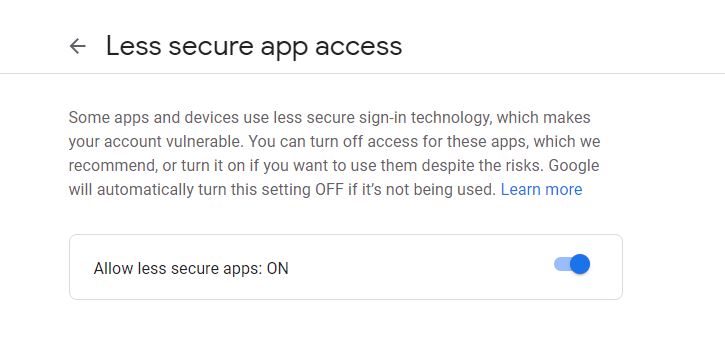
02 Configuration
CentOS:
Login in with root via SSH
- Install POSTFIX and mailx
yum install postfix
systemctl restart postfix
yum install cyrus-sasl cyrus-sasl-lib cyrus-sasl-plain
yum install mailx
- Edit main.cf
nano /etc/postfix/main.cf
- Add blow lines to the end of main.cf
#postfix send email via gmail on Aug 09 2020
relayhost = [smtp.gmail.com]:587smtp_sasl_auth_enable = yessmtp_sasl_password_maps = hash:/etc/postfix/sasl_passwdsmtp_sasl_security_options = noanonymoussmtp_use_tls = yes
- Create the file /etc/postfix/sasl_passwd with the following contents:
nano /etc/postfix/sasl_passwd
- Add your Gmail information
[smtp.gmail.com]:587 user.name@gmail.com:password
- Restrict permissions on the postfix file:
chmod 400 /etc/postfix/sasl_passwd
chown root.root /etc/postfix/sasl_passwd
- Hash the file into a .db that Postfix will read:
postmap /etc/postfix/sasl_passwd
- Change the owner of the sasl_passwd to the postfix user:
chown postfix /etc/postfix/sasl_passwd
- Reload postfix:
service postfix restart
- Test email
echo "Test mail from postfix" | mail -s "Test Postfix" youremail@gmail.com
Debian or Ubuntu Server:
The process is almost same as CentOS, the only difference is to install mailutils instead of mailx.
sudo apt install mailutils
Ubuntu Server:
To send email via a Gmail account from an Ubuntu Linux server, you can follow these steps:
- Install the
ssmtppackage on your Ubuntu Linux server using the following command:
sudo apt-get update

sudo apt-get install ssmtp
- Once the package is installed, open the SSMTP configuration file using a text editor:
sudo nano /etc/ssmtp/ssmtp.conf
- Modify the configuration file with the following settings:
root=<your-email-address>
mailhub=smtp.gmail.com:587
rewriteDomain=gmail.com
hostname=<your-hostname>
UseSTARTTLS=YES
AuthUser=<your-gmail-username>
AuthPass=<your-gmail-password>
FromLineOverride=YES
Replace <your-email-address>, <your-hostname>, <your-gmail-username>, and <your-gmail-password> with your own values.
-
Save the file and exit the text editor.
-
Test the email configuration by sending a test email using the following command:
echo "This is a test email" | sudo ssmtp <recipient-email-address>
Replace <recipient-email-address> with the email address of the recipient you want to send the email to.
- If the test email is sent successfully, you can use the
ssmtpcommand to send email from your Ubuntu Linux server using your Gmail account.
Note: Google may block sign-in attempts from some apps or devices that do not use modern security standards.
If you encounter issues, you may need to adjust the security settings of your Google account to allow access from less secure apps.
Debian Linux server
- Install the
ssmtppackage on your Debian Linux server using the following command:
sudo apt-get update
sudo apt-get install ssmtp
- Once the package is installed, open the SSMTP configuration file using a text editor:
sudo nano /etc/ssmtp/ssmtp.conf
- Modify the configuration file with the following settings:
root=<your-email-address>
mailhub=smtp.gmail.com:587
rewriteDomain=gmail.com
hostname=<your-hostname>
UseSTARTTLS=YES
AuthUser=<your-gmail-username>
AuthPass=<your-gmail-password>
FromLineOverride=YES
Replace <your-email-address>, <your-hostname>, <your-gmail-username>, and <your-gmail-password> with your own values.
-
Save the file and exit the text editor.
-
Test the email configuration by sending a test email using the following command:
echo "This is a test email" | sudo ssmtp <recipient-email-address>
Replace <recipient-email-address> with the email address of the recipient you want to send the email to.
- If the test email is sent successfully, you can use the
ssmtpcommand to send email from your Debian Linux server using your Gmail account.
Note: Google may block sign-in attempts from some apps or devices that do not use modern security standards.
If you encounter issues, you may need to adjust the security settings of your Google account to allow access from less secure apps.
Free IP PBX solutions:
- Asterisk (FreePBX)
- Freeswitch (FusionPBX)
- SIPFoundry
- OpenSIPS
- Kamailio
How to Build an Enterprise-class Phone System?
How to Build IP-PBX on Raspberry Pi?