Replacing Microsoft Outlook on Linux: The Best Email Clients Compared
Replacing Microsoft Outlook on Linux: The Best Email Clients Compared
- 60% of MD5 Password Hashes Can Be Cracked in Under an Hour with a Single GPU
- Dirty Frag: Root Access on Every Major Linux Distribution — No Patch, No Warning
- Ubuntu 26.04 LTS (Resolute Raccoon): The Most Ambitious Ubuntu LTS in a Decade
- Proton Mail: Data Transferred to FBI Again!
- How Close Are Quantum Computers to Breaking RSA-2048?
- How to Prevent Ransomware Infection Risks?
- What is the best alternative to Microsoft Office?
Replacing Microsoft Outlook on Linux: The Best Email Clients Compared
The Best Outlook Alternatives for Linux: Finding the Closest Match to Microsoft Outlook
For many professionals migrating from Windows to Linux, one of the biggest questions is: What email client on Linux can replace Microsoft Outlook?
Outlook’s deep integration of email, calendar, contacts, and tasks — along with Microsoft Exchange support — makes it a tough act to follow.
Fortunately, Linux offers several capable alternatives that come close in both functionality and user experience.
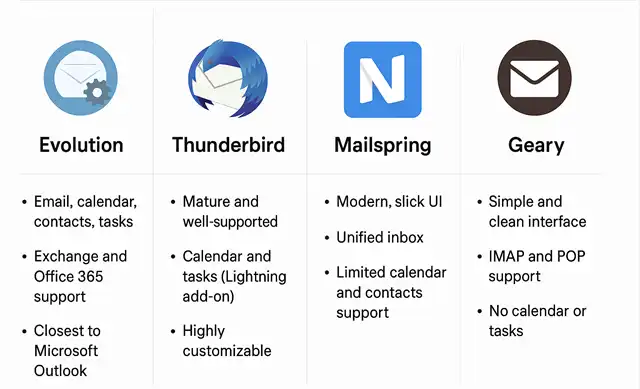
1. Evolution — The Closest Match to Microsoft Outlook
Evolution is widely considered the best Outlook alternative on Linux. Developed by GNOME, it integrates email, calendar, contacts, tasks, and notes into a single, unified interface — just like Outlook.
Key features:
-
Full Exchange and Office 365 support via EWS or MAPI connectors.
-
Integrated calendar and contact management.
-
Familiar three-pane layout (folders → message list → preview).
-
Native support in GNOME desktop environments and available on most distributions.
Pros:
-
Excellent feature parity with Outlook.
-
Enterprise-ready with robust Exchange integration.
-
Handles large mailboxes and corporate workflows well.
Cons:
-
Slightly dated interface compared to modern mail clients.
-
Occasional issues with advanced Outlook-specific features like delegation.
Verdict:
If you want the closest possible experience to Outlook on Linux, Evolution is the clear winner. It’s the best choice for business users who rely on Exchange or Office 365.
2. Thunderbird — Reliable and Highly Customizable
Mozilla Thunderbird has long been one of the most trusted email clients in the open-source world. While not designed as a direct Outlook clone, it can become a powerful productivity hub with the right extensions.
Key features:
-
Supports IMAP, POP3, and Exchange (via add-ons).
-
Built-in calendar and task management (through the Lightning extension).
-
Rich add-on ecosystem for customization and encryption.
Pros:
-
Extremely stable and actively developed.
-
Highly extensible through plug-ins.
-
Familiar UI for many long-time email users.
Cons:
-
Requires configuration to fully integrate Exchange/Office 365 accounts.
-
Calendar and tasks are not as tightly integrated as in Evolution.
Verdict:
Thunderbird is ideal for users who want a reliable, open-source client with great flexibility and don’t mind a little manual setup for enterprise integration.
3. Mailspring — Modern Design, Simplicity, and Speed
For users who value aesthetics and simplicity, Mailspring delivers a polished and modern interface reminiscent of newer versions of Outlook.
Key features:
-
Unified inbox for multiple accounts.
-
Fast search and conversation view.
-
Support for Office 365, Gmail, and IMAP accounts.
-
Read receipts, snooze, and other productivity tools.
Pros:
-
Sleek, modern design optimized for productivity.
-
Lightweight and responsive.
-
Cross-platform support (Windows, macOS, Linux).
Cons:
-
Limited calendar and contact integration.
-
Some advanced features require a paid “Pro” version.
Verdict:
Mailspring is best for users who want a clean, Outlook-style interface without the complexity of full Exchange or calendar management.
4. Geary — Lightweight and Minimalist
Geary focuses on simplicity and usability, offering a minimalistic interface for users who primarily need email, not a full productivity suite.
Key features:
-
Clean, distraction-free design.
-
IMAP and POP3 support.
-
Smooth performance in GNOME environments.
Pros:
-
Very easy to use, lightweight, and fast.
-
Perfect for personal email use.
Cons:
-
No native calendar, contacts, or task integration.
-
Lacks advanced features required in corporate environments.
Verdict:
Geary is a great choice for users who want a simple, fast, and lightweight email client without business-level features.
Conclusion: Which One Should You Choose?
| Priority | Best Choice | Why |
|---|---|---|
| Closest to Outlook (all features) | Evolution | Full integration of email, calendar, contacts, tasks, and Exchange |
| Most stable & customizable | Thunderbird | Mature, reliable, and extensible |
| Most modern & visually polished | Mailspring | Clean design and smooth user experience |
| Lightest & easiest to use | Geary | Minimal, fast, and user-friendly |
Final verdict:
For corporate users or those who depend on Microsoft Exchange, Evolution remains the top recommendation. If you want something more flexible or visually modern, Thunderbird and Mailspring are excellent alternatives.
Linux may not have a one-to-one clone of Microsoft Outlook, but with the right client and configuration, it can easily match — and in some cases exceed — the productivity and control that Outlook users enjoy on Windows.
What is the best alternative to Microsoft Office?
The Best Free Adobe Acrobat Alternatives for Linux
Why German State Governments Are Abandoning Microsoft Office for Open-Source Solutions


