Linux Milestone: Adobe Creative Cloud Finally Runs via Native Installer on Wine
Linux Milestone: Adobe Creative Cloud Finally Runs via Native Installer on Wine
- Apple’s Native Linux Container Tool Has Arrived — But Can It Really Replace Docker?
- 60% of MD5 Password Hashes Can Be Cracked in Under an Hour with a Single GPU
- Dirty Frag: Root Access on Every Major Linux Distribution — No Patch, No Warning
- Proton Mail: Data Transferred to FBI Again!
- How Close Are Quantum Computers to Breaking RSA-2048?
- What is the best alternative to Microsoft Office?
Linux Milestone: Adobe Creative Cloud Finally Runs via Native Installer on Wine
For over a decade, the “Adobe barrier” has been the primary reason creative professionals have hesitated to switch from Windows to Linux.
While tools like Wine and Proton have revolutionized Linux gaming, Adobe’s Creative Cloud (CC) suite remained notoriously difficult to install, often requiring complex scripts or manual file transfers from Windows partitions.
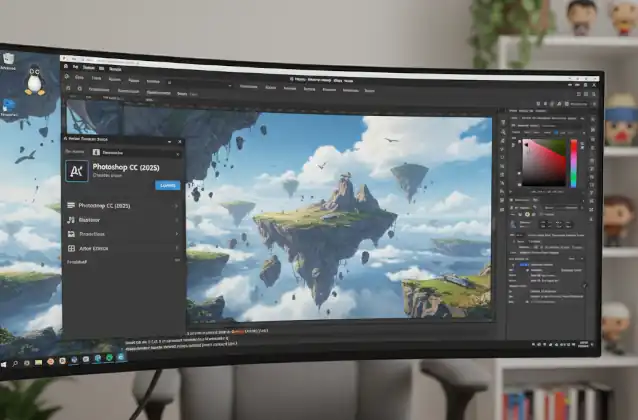
That barrier has finally been breached. Developer Phialsbasement has recently achieved a technical breakthrough by patching Wine to support Adobe’s native installers, marking a “quality-of-life” revolution for the Linux desktop.
The Best Free Adobe Acrobat Alternatives for Linux
Cracking the Adobe Code
The difficulty wasn’t just in running Photoshop itself, but in getting the Creative Cloud Desktop app to function. This app acts as a gateway for licensing and installation, and it relies heavily on obscure Windows-specific web technologies.
According to technical analysis and the developer’s posts on Reddit and GitHub, the breakthrough addressed two core “technical debt” issues within Wine:
-
Non-Standard XML Parsing: Adobe’s installer uses XML formatting that violates strict standards. While Microsoft’s original XML libraries are “forgiving” and allow these errors, Wine’s underlying library (
libxml2) is strict and would crash upon encountering them. Phialsbasement’s patch introduces a “loose” parsing mode to mimic Windows’ behavior. -
Legacy JavaScript Execution: The installer utilizes an old Internet Explorer 9-era JavaScript event model. Previous versions of Wine could not correctly compile these specific event handles or handle Microsoft-proprietary extensions, leading to a “frozen” installation wizard.
The Best Free Photoshop Alternatives for Linux OS
From “Broken” to “Butter Smooth”
With these patches applied, users have reported being able to launch the Photoshop CC 2021 and Photoshop CC 2025 installers directly on Linux.
Preliminary testing results within the WineDB (Wine Database) community are promising:
-
Installation: Native, automated, and successful without external scripts.
-
Performance: Photoshop 2021 is described as running “butter smooth.”
-
Compatibility: While core tools work, minor issues remain—most notably drag-and-drop functionality on Wayland and certain GPU-accelerated filters that still require fine-tuning.
The Best Free Video Editing Software for Linux OS
How to Get It (And What’s Next)
Currently, this feature is not yet available in the standard stable versions of Wine or Steam’s Proton. Users who wish to test this must:
-
Clone the source code from Phialsbasement’s GitHub repository.
-
Manually compile Wine with the specific Adobe patches.
-
Perform minor post-install configuration for font rendering and GPU drivers.
The developer initially approached Valve to include these fixes in Proton, but was advised to submit them directly to the WineHQ upstream project. If merged into the main Wine branch, this functionality will eventually trickle down to every major Linux distribution, allowing users to install Adobe apps as easily as they do on Windows.
Free Project Management Software Alternatives to MS Project for Linux
The Bottom Line:
While the “Linux year of the desktop” is a long-standing meme, the ability to run industry-standard creative tools natively is a tangible shift.
This breakthrough moves Linux one step closer to being a viable home for professional designers and photographers.
Linux Disk Encryption: A Comprehensive Guide to BitLocker Alternatives
The Source Code: PhialsBasement
The official repository for this project is hosted on GitHub under the user PhialsBasement. It contains the necessary patches to modify Wine’s behavior for the Adobe Creative Cloud installer.
-
Repository: PhialsBasement/wine-photoshop-installers
How to Install (Two Primary Methods)
According to the latest developer updates (January 20, 2026), there are two main ways to use these patches:
Method 1: Using Steam’s Compatibility Tools (Easiest)
If you use Steam, you can add the Adobe installer as a “Non-Steam Game” and use the developer’s pre-compiled version of Proton.
-
Download: Grab the
proton-*.tar.gzfile from the repository’s Releases page. -
Extract: Move the extracted folder to
~/.steam/root/compatibilitytools.d/. -
Steam Setup: Restart Steam, add
Set-up.exe(the Adobe installer) as a Non-Steam game. -
Launch: In the game properties, under “Compatibility,” force the use of the specific “Proton-Adobe” version you just installed.
Method 2: Compiling from Source (Advanced)
If you prefer a standalone Wine installation, you will need to compile it manually to include the msxml3 and mshtml fixes.
-
Clone the Repo:
Bashgit clone https://github.com/PhialsBasement/wine-photoshop-installers.git cd wine-photoshop-installers -
Install Dependencies: You will need standard build tools and development libraries:
-
gcc,make,flex,bison -
libxml2-devel,fontconfig-devel,gnutls-devel
-
-
Configure and Build:
Bash./configure make -j$(nproc) -
Run: Use the resulting
winebinary to launch the Adobe Creative Cloud installer.
Important Post-Installation Tips
-
Winetricks: It is highly recommended to use
winetricksto install common Windows fonts (corefonts) and Visual C++ redistributables (vcrun2017) into your prefix before running the installer. -
GPU Acceleration: If the application launches but shows a black screen, try disabling GPU acceleration in Photoshop’s preferences (or via the registry) as Wine’s implementation of certain Adobe-specific GPU calls can still be unstable.
-
Collection Installer: The latest update from the developer confirms that the Adobe Collection Installer (which allows installing multiple apps at once) is now also working with these patches.