How Apple’s Lockdown Mode Stopped the FBI: The Hannah Natanson Case
How Apple’s Lockdown Mode Stopped the FBI: The Hannah Natanson Case
- 60% of MD5 Password Hashes Can Be Cracked in Under an Hour with a Single GPU
- Dirty Frag: Root Access on Every Major Linux Distribution — No Patch, No Warning
- Ubuntu 26.04 LTS (Resolute Raccoon): The Most Ambitious Ubuntu LTS in a Decade
- Proton Mail: Data Transferred to FBI Again!
- How Close Are Quantum Computers to Breaking RSA-2048?
- How to Prevent Ransomware Infection Risks?
- What is the best alternative to Microsoft Office?
How Apple’s Lockdown Mode Stopped the FBI: The Hannah Natanson Case
A journalist’s iPhone withstood federal investigators—here’s what that means for digital security
February 11, 2026 — In what legal experts are calling the first time the U.S. Justice Department has raided a journalist’s home in connection with a national security leak investigation, the FBI discovered an unexpected obstacle: Apple’s Lockdown Mode.
On January 14, 2026, FBI agents raided the home of Washington Post reporter Hannah Natanson as part of an investigation into leaked classified materials.
The FBI seized her phone, work laptop, personal laptop, and other devices including a Garmin watch. However, court documents revealed a crucial detail: the FBI’s Computer Analysis Response Team (CART) was unable to access her iPhone because it was in Lockdown Mode.
What Happened During the Raid
Natanson, a Washington Post reporter who covers federal government operations, is not the target of the investigation—the FBI is investigating government contractor Aurelio Perez-Lugones, who allegedly mishandled classified materials.
According to reports, the FBI was able to access her work MacBook by forcing her to use her fingerprint on Touch ID, but could not access her personal laptop which was password-protected. The iPhone, protected by Lockdown Mode, remained impenetrable.
Washington Post executive editor Matt Murray called the raid “extraordinary” and “aggressive,” raising “profound questions and concerns around the constitutional protections for our work”.
Understanding Apple’s Lockdown Mode
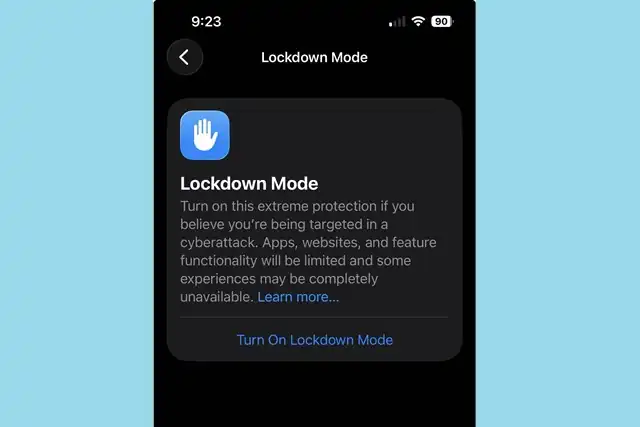
Lockdown Mode is an optional, extreme protection that’s designed for the very few individuals who, because of who they are or what they do, might be personally targeted by some of the most sophisticated digital threats.
Introduced in 2022 with iOS 16, Lockdown Mode helps protect devices against extremely rare and highly sophisticated cyber attacks. When enabled, the feature significantly restricts device functionality to reduce potential attack surfaces.
Key Restrictions Include:
Messages: Most message attachment types other than images are blocked, and features like link previews are disabled
Web Browsing: Certain complex web technologies, like just-in-time (JIT) JavaScript compilation, are disabled unless the user excludes a trusted site from Lockdown Mode
FaceTime: Incoming invitations and service requests, including FaceTime calls, are blocked if the user has not previously sent the initiator a call or request
Device Connections: Connections with a computer or accessory are blocked when the device is locked
Wireless Connectivity: Your device won’t automatically join non-secure Wi-Fi networks and will disconnect from a non-secure Wi-Fi network when you turn on Lockdown Mode. 2G and 3G cellular support is turned off for iPhone and iPad.
Who Should Use Lockdown Mode?
Turn it on if you handle sensitive work that might attract targeted surveillance (investigative reporting, human-rights advocacy, high-stakes legal or political activity, executive roles in sensitive sectors), especially if you’ve received a threat notification or have reason to suspect targeting.
However, probably skip it if you’re an average consumer without signs of targeted interest. Lockdown Mode imposes friction (e.g., blocked attachments, reduced web features) you’re unlikely to want day-to-day, and it’s not necessary against routine cybercrime like phishing, scam calls, or run-of-the-mill malware.
Specific career choices may benefit from improved iPhone security, including public or military service, high-profile private jobs that might encourage corporate espionage, journalism, and advocacy work. People fleeing or fearing authoritarian regimes, close to war zones, and whistleblowers can also consider turning it on.
How to Enable Lockdown Mode
The process is straightforward:
On iPhone or iPad: Go to Settings > Privacy & Security > Lockdown Mode. Tap Turn On Lockdown Mode, Tap Turn On Lockdown Mode again, Tap Turn On & Restart, then enter your passcode
On Mac: Choose Apple menu > System Settings, click Privacy & Security in the sidebar, then click Lockdown Mode. Click Turn On, then click Turn On Lockdown Mode. Click Turn On & Restart. Enter your login password, then click OK
Lockdown Mode must be turned on separately for iPhone, iPad, and Mac. When you turn on Lockdown Mode on iPhone, it automatically turns on Lockdown Mode for any paired Apple Watch.
The Broader Context: Press Freedom Under Pressure
The raid on Natanson’s home has sparked outrage among press freedom advocates. Reporters Committee President Bruce D. Brown called the search “a tremendous escalation in the administration’s intrusions into the independence of the press,” highlighting the danger that such searches can pose to confidential sources and to public interest reporting broadly.
“Searching a journalist’s home and electronic devices, especially one who is not the subject of a criminal investigation, raises grave concerns under federal law and represents a dangerous escalation in the federal government’s recent treatment of journalists”, stated a coalition of press freedom groups led by the Society of Professional Journalists.
The Privacy Protection Act generally protects journalists from searches of their work materials unless investigators suspect the journalist has committed a crime. That Natanson was told she is not the subject of the investigation raises the question of what the government told the court to justify issuing the warrant.
What This Means for Digital Security
The Natanson case demonstrates that consumer-grade security features can withstand even sophisticated law enforcement tools when properly configured. At launch, Apple offered a $2 million bounty for any security researchers who could break Lockdown Mode, signaling the company’s confidence in the feature’s robustness.
The U.S. Cybersecurity and Infrastructure Security Agency (CISA) has recently included Lockdown Mode in a list of security guidelines for iPhone users, further validating its effectiveness as a security measure.
However, experts caution that Lockdown Mode does not protect you if someone has physical access to your phone. Be sure to use a strong password and passcodes on your devices.
The Trade-offs
While Lockdown Mode offers extreme protection, it comes at a cost. Lockdown Mode makes tradeoffs for increased security at the expense of functionality, performance, or both.
For some people, enabling Lockdown Mode will significantly change how it feels to use an iPhone or iPad, and may disable certain features you regularly use. Some of these trade-offs will be more difficult than others to make, and whether or not it’s worth it for you depends on your security plan, how you use your device, and what features you rely on.
Conclusion
The inability of the FBI’s Computer Analysis Response Team to access Hannah Natanson’s iPhone serves as a powerful testament to the effectiveness of Apple’s Lockdown Mode. While this feature isn’t necessary for most users, it provides critical protection for journalists, activists, and others who face genuine digital security threats.
For those who handle sensitive information or face potential targeting, the message is clear: Lockdown Mode works. The trade-off in convenience may be significant, but for those who need it, the security benefits are undeniable—even the FBI couldn’t get around it.
Note: While Lockdown Mode provides strong protection, it should be part of a comprehensive security strategy that includes strong passwords, regular software updates, and careful consideration of which devices and accounts contain sensitive information.


