What are Disk Encryption Alternatives If You Think BitLocker Unsafe?
What are Disk Encryption Alternatives If You Think BitLocker Unsafe?
- Why Enterprise RAID Rebuilding Succeeds Where Consumer Arrays Fail?
- Linus Torvalds Rejects MMC Subsystem Updates for Linux 7.0: “Complete Garbage”
- The Man Who Maintained Sudo for 30 Years Now Struggles to Fund the Work That Powers Millions of Servers
- How Close Are Quantum Computers to Breaking RSA-2048?
- Why Windows 10 Users Are Flocking to Zorin OS 18 Instead of Linux Mint?
- How to Prevent Ransomware Infection Risks?
- What is the best alternative to Microsoft Office?
What are Disk Encryption Alternatives If You Think BitLocker Unsafe?
Recent revelations about Microsoft providing BitLocker recovery keys to government agencies approximately 20 times per year have prompted many users to reconsider their encryption choices.
While Microsoft complies with valid court orders by handing over recovery keys stored in the cloud, this practice raises important questions about who controls access to your encrypted data.
For users seeking alternatives that prioritize different security models, several robust disk encryption solutions exist. Each offers distinct approaches to protecting your data, with varying levels of control over encryption keys.
How Close Are Quantum Computers to Breaking RSA-2048?
Understanding the Core Issue
The concern with BitLocker isn’t the encryption strength itself—it’s about key custody.
When you allow Windows to back up your BitLocker recovery key to your Microsoft account (the default for many configurations), Microsoft can technically access it.
This creates a scenario where a third party holds the keys to your encrypted kingdom.
The alternatives below address this issue in different ways, generally giving you more direct control over your encryption keys.
VeraCrypt
VeraCrypt is the spiritual successor to the discontinued TrueCrypt project and remains the most popular open-source disk encryption solution for Windows, macOS, and Linux.
Advantages:
- Completely free and open-source, allowing independent security audits and community verification of the code
- Cross-platform compatibility means you can access encrypted volumes on Windows, Mac, and Linux systems
- No cloud key storage or third-party key custody—you maintain complete control over your encryption keys
- Supports plausible deniability through hidden volumes, allowing you to create a concealed encrypted space within another encrypted volume
- Strong encryption algorithms including AES, Serpent, and Twofish, with options for cascading multiple algorithms
- Can encrypt entire system drives, individual partitions, or create encrypted container files
Disadvantages:
- User interface is less polished than commercial solutions and can be intimidating for non-technical users
- No official corporate support, though community forums provide assistance
- System encryption on Windows requires authentication before the operating system loads, which can complicate some boot scenarios
- Performance can be slightly slower than hardware-accelerated solutions like BitLocker on modern systems
- Recovery is entirely your responsibility—if you lose your password and recovery files, your data is permanently inaccessible
What is the best alternative to Microsoft Office?
LUKS (Linux Unified Key Setup)
LUKS is the standard disk encryption system for Linux distributions and is built directly into the Linux kernel.
Advantages:
- Native integration with Linux means excellent performance and reliability on Linux systems
- Completely free and open-source with widespread adoption across the Linux community
- Allows multiple passphrases for the same encrypted volume, useful for shared systems or key rotation
- Strong default security settings chosen by security experts
- Well-documented and supported by all major Linux distributions
- No third-party key storage—keys remain under your complete control
Disadvantages:
- Linux-only solution, making it impractical for Windows or macOS users or for portable encrypted drives
- Command-line setup can be daunting for newcomers, though many Linux distributions now offer graphical installers
- Recovery tools exist but are more complex than commercial alternatives
- Less suitable for users who need cross-platform access to encrypted data
How to Prevent Ransomware Infection Risks
FileVault (macOS)
FileVault is Apple’s built-in disk encryption solution for macOS, comparable to BitLocker but with a different key management philosophy.
Advantages:
- Seamlessly integrated into macOS with minimal performance impact due to hardware acceleration
- Simple setup through System Preferences with no additional software required
- Recovery key is generated locally and can be stored offline—not automatically uploaded to iCloud unless you explicitly choose that option
- Uses strong XTS-AES-128 encryption with a 256-bit key
- Transparent operation that doesn’t interfere with daily use
- Can integrate with institutional key escrow systems for enterprise management
Disadvantages:
- Exclusive to macOS, limiting its usefulness for multi-platform users
- If you enable iCloud key recovery, Apple can technically access your recovery key (similar to BitLocker’s cloud backup issue)
- Less flexibility in encryption algorithms compared to VeraCrypt
- Tied to Apple’s ecosystem and proprietary implementations
Why is it difficult for viruses to “infect” Linux OS?
Cryptomator
Cryptomator takes a different approach by encrypting individual files rather than entire disks, particularly useful for cloud storage encryption.
Advantages:
- Designed specifically for encrypting files before uploading to cloud storage services like Dropbox, Google Drive, or OneDrive
- Open-source and free for desktop use, with paid mobile apps
- Works across Windows, macOS, Linux, iOS, and Android
- Individual file encryption means corrupted data affects only specific files, not entire volumes
- No cloud key storage—encryption happens locally before files reach cloud servers
- Lightweight and doesn’t require administrative privileges to use
Disadvantages:
- Not designed for full-disk encryption, so it doesn’t protect your entire system
- Requires the Cryptomator application to access files, unlike transparent disk encryption
- Performance overhead when working with large numbers of files
- Not ideal for encrypting your operating system or boot drive
- Mobile apps require a paid license
Why VPN Security Should Be Every Enterprise’s Top Priority
DiskCryptor (Windows)
DiskCryptor is an open-source disk encryption solution specifically designed for Windows systems.
Advantages:
- Free and open-source with focus on Windows platform optimization
- Supports encryption of all disk types including system drives, external drives, and removable media
- Faster than some alternatives due to Windows-specific optimizations
- Uses strong encryption algorithms including AES, Twofish, and Serpent
- No third-party key storage or cloud backup requirements
- Simpler interface than VeraCrypt for basic encryption tasks
Disadvantages:
- Windows-only, limiting cross-platform utility
- Smaller development community compared to VeraCrypt, potentially meaning slower updates
- Less widely audited than more established solutions
- Limited corporate or enterprise support options
- Documentation is less comprehensive than commercial alternatives
XChat Security Analysis: Safe as “Bitcoin-style” peer-to-peer encryption?
Choosing the Right Solution
Your choice of encryption software should depend on several factors: your operating system, technical comfort level, need for cross-platform access, and most importantly, your threat model.
If you’re primarily concerned about preventing unauthorized access in case of device theft, nearly any of these solutions will suffice. However, if you’re specifically worried about government access or third-party key custody, solutions like VeraCrypt that keep encryption keys entirely under your control offer the strongest protection.
Remember that encryption is only as strong as your password and key management practices. Regardless of which solution you choose, use strong, unique passphrases and store recovery information securely offline.
The most sophisticated encryption in the world provides no protection if someone can simply ask the service provider for your keys—or guess your password.
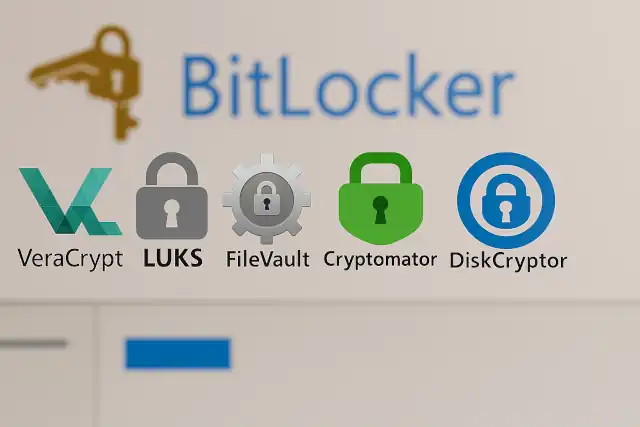
Official Websites of Disk Encryption Tools
| Tool | Official Website | Notes |
|---|---|---|
| VeraCrypt | https://www.veracrypt.fr or https://veracrypt.io | Maintained by IDRIX, successor to TrueCrypt |
| LUKS | https://gitlab.com/cryptsetup/cryptsetup | LUKS is part of the Cryptsetup project |
| FileVault | https://support.apple.com/en-ca/guide/security/secbf9b00276/web (support.apple.com in Bing) | Built into macOS; managed via System Settings |
| Cryptomator | https://cryptomator.org | Open-source client-side encryption for cloud storage |
| DiskCryptor | https://diskcryptor.org | Community-maintained fork of the original project |