Microsoft Edge’s New AI Guardrails: What Enterprises Really Need to Know
Microsoft Edge’s New AI Guardrails: What Enterprises Really Need to Know
- 60% of MD5 Password Hashes Can Be Cracked in Under an Hour with a Single GPU
- Dirty Frag: Root Access on Every Major Linux Distribution — No Patch, No Warning
- Ubuntu 26.04 LTS (Resolute Raccoon): The Most Ambitious Ubuntu LTS in a Decade
- Proton Mail: Data Transferred to FBI Again!
- How Close Are Quantum Computers to Breaking RSA-2048?
- How to Prevent Ransomware Infection Risks?
- What is the best alternative to Microsoft Office?
Microsoft Edge’s New AI Guardrails: What Enterprises Really Need to Know
Microsoft’s plan to let IT admins block third-party AI tools in Edge for Business is real — but it’s more sophisticated, and harder to bypass, than widely reported.
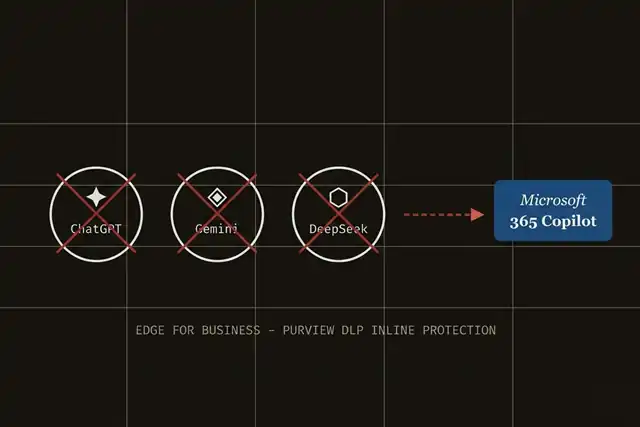
A widely circulated report is making the rounds claiming that Microsoft will soon begin “blocking” third-party AI tools inside its Edge browser, redirecting employees straight to its own Microsoft 365 Copilot. The core story is real. But the full picture is more nuanced — and considerably harder to bypass — than most accounts suggest.
Microsoft announced expanded capabilities for Edge for Business at the RSAC 2026 conference in late March 2026, building on a foundation laid throughout 2025. The feature is now generally available, not merely on the horizon.
What Microsoft Actually Announced
The capability lives inside Microsoft Purview’s Data Loss Prevention (DLP) framework, specifically a function called inline web traffic protection. Rather than being a simple website block, the system operates at the prompt level: it analyzes what employees type into consumer AI tools in real time and can audit or block submissions when sensitive data is detected — before a single character is transmitted to an external server.
When a blocked action occurs, the user sees a clear policy notification and is offered a button to switch to Microsoft 365 Copilot, where enterprise-grade data protections apply, including compliance boundaries, tenant isolation, and a commitment not to use enterprise data for model training.
Shadow AI introduces data exfiltration risks — but with higher stakes. When employees upload sensitive information into consumer AI tools, that data can be retained or used to train models, increasing the risk of long-term IP loss.
— Microsoft Edge Blog, RSAC 2026 Announcement, March 2026The Supported AI Tools List
Microsoft confirmed that the list of covered consumer AI tools has been significantly expanded as of the RSAC 2026 announcement. The initial rollout in early 2025 started with ChatGPT, DeepSeek, Google Gemini, and Microsoft’s own consumer Copilot. The full updated list now covers over twenty mainstream services including Grok (xAI), Perplexity AI, QwenChat, Meta AI, Adobe Firefly, Runway, and others.
- Prompt-level analysis: Sensitive content is detected and blocked before it leaves the browser — not just at the site-access level.
- Redirect to Copilot: Blocked prompts are offered for re-submission via Microsoft 365 Copilot, where enterprise data policies apply.
- Managed & unmanaged devices: Protections apply to both corporate and personal (BYOD) devices, as long as the user is signed into Edge for Business with their Entra ID.
- Cross-browser enforcement: When policy is set to “Block,” users are also blocked from accessing flagged AI services in Firefox and other third-party browsers at the device level.
- Chrome handling: Chrome users are blocked unless the Microsoft Purview extension is installed, at which point the same DLP policies apply.
- Licensing: Requires Microsoft Purview capabilities via pay-as-you-go billing or per-user licensing (typically Microsoft 365 E5 or equivalent).
- Status: Prompt-level protections are now generally available as of Q1 2026.
The “Just Switch Browsers” Myth
One of the most repeated claims in coverage of this feature is that employees can easily circumvent the controls by opening Chrome, Firefox, or another browser. This is significantly overstated.
According to Microsoft’s own documentation, when a Purview DLP policy is configured to Block, users are prevented at the device level from opening Firefox and other non-Edge browsers altogether. Chrome is also blocked unless the Microsoft Purview extension is installed and up to date — at which point the same DLP restrictions propagate into Chrome as well.
Furthermore, protections extend to personal and unmanaged devices through a combination of Microsoft Intune and Purview, covering BYOD scenarios that have historically been the hardest security gap to close.
The Legitimate Security Case
Enterprise data security professionals have flagged “shadow AI” — employees using unsanctioned AI tools with sensitive company data — as a growing and genuine risk. An employee pasting confidential financial records or client data into a public AI interface creates real exposure: the data may be retained, used for model training, or simply exist outside any corporate compliance boundary.
Microsoft’s response is logically coherent from a security standpoint. The Purview DLP system already governs data sharing across Microsoft 365 apps; extending it to browser-based AI interactions is an architectural continuation, not a novel product.
The Competitive Dimension
It is, of course, impossible to ignore the commercial dimension. The system’s natural endpoint — when a prompt is blocked — is a redirect button to Microsoft 365 Copilot. Every competitor on the blocked list is a paid service that competes directly with Microsoft’s own AI subscription offering. The mechanism that “protects” enterprise data simultaneously channels users toward Microsoft’s revenue-generating product.
The feature is a genuine enterprise security tool with real utility for IT and compliance teams. It is also, structurally, a competitive moat. Both things can be true at once. Organizations evaluating it should assess whether the data protection benefits justify increased dependency on the Microsoft ecosystem — and whether Microsoft 365 Copilot genuinely meets their AI workflow needs before it becomes the default by policy rather than by choice.
What Happens Next
Microsoft announced that prompt-level data protections in Purview are now generally available. IT departments at enterprises running Microsoft 365 E5 or equivalent licensing can configure policies today through the Microsoft Purview portal under Data Loss Prevention → Inline web traffic.
For organizations not yet on qualifying licensing tiers, the capability remains out of reach — though Microsoft’s consistent pattern of migrating security features down-market over time suggests broader availability may follow.
The browser, long treated as a passive conduit, has become an active security enforcement layer. For enterprise IT teams, that shift has arrived.