Why the Second Disk Is Most Likely to Fail During RAID Rebuild?
Why the Second Disk Is Most Likely to Fail During RAID Rebuild?
- Apple’s Native Linux Container Tool Has Arrived — But Can It Really Replace Docker?
- 60% of MD5 Password Hashes Can Be Cracked in Under an Hour with a Single GPU
- Dirty Frag: Root Access on Every Major Linux Distribution — No Patch, No Warning
- Proton Mail: Data Transferred to FBI Again!
- How Close Are Quantum Computers to Breaking RSA-2048?
- What is the best alternative to Microsoft Office?
Why the Second Disk Is Most Likely to Fail During RAID Rebuild?
One of the most counterintuitive and concerning phenomena in storage systems is that disk failures often come in pairs.
When a disk fails in a RAID array and the rebuild process begins, the probability of a second disk failing dramatically increases. This isn’t just bad luck—it’s a predictable pattern that has significant implications for data protection strategies.
Understanding why this happens and which RAID configurations are most vulnerable is critical for anyone managing important data.
The Core Problem: Correlated Failures
Age and Manufacturing Batch
Disk drives in an array are typically purchased together and installed at the same time. This seemingly innocent fact creates a hidden vulnerability:
- Similar age means similar wear: All drives have accumulated roughly the same number of power-on hours and write cycles
- Manufacturing batch correlation: Drives from the same production batch may share manufacturing defects or quality issues
- Synchronized degradation: Components like bearings, motors, and magnetic surfaces wear at similar rates across all drives
When one drive reaches its failure point, the others are often not far behind.
Shared Environmental Stresses
Drives in the same enclosure experience identical environmental conditions:
- Temperature fluctuations: All drives heat up and cool down together
- Power quality issues: Voltage spikes or brownouts affect all drives simultaneously
- Vibration: Mechanical vibration from spinning drives affects neighboring drives
- Humidity and contamination: Environmental factors impact all drives equally
These shared stresses mean that if conditions were harsh enough to kill one drive, they’ve been harsh on all the others too.
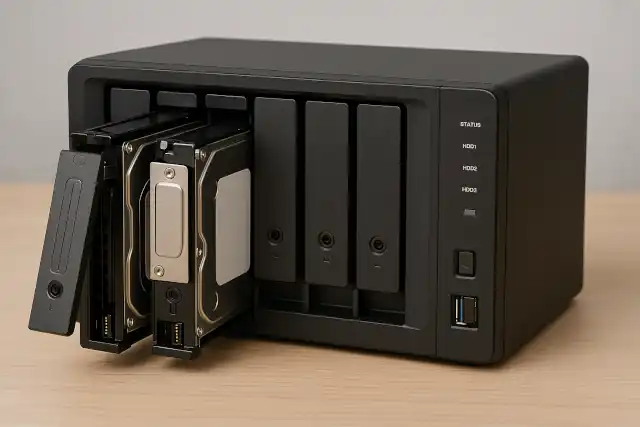
The Rebuild Process: A Perfect Storm
Intensive Read Operations
When a RAID array begins rebuilding, the surviving drives face unprecedented stress:
- Every sector must be read: The rebuild process reads every single block from every surviving drive
- Latent errors surface: Bad sectors or marginal areas that worked “well enough” during normal operation now cause read failures
- No rest periods: Unlike normal workloads with idle time, rebuilds run continuously
- Heat generation: Sustained activity raises drive temperatures, accelerating wear
A drive that was limping along with minor issues may completely fail under this sustained load.
Extended Vulnerability Window
Modern high-capacity drives have made the rebuild problem worse:
- Massive capacity: A 10TB drive can take 24-48 hours or more to rebuild
- Slow rebuild speeds: The process is I/O intensive and deliberately throttled to maintain array availability
- Long exposure: The array operates in a degraded state for an extended period
- No redundancy buffer: During this window, many RAID levels have no margin for additional failures
Undetected Pre-existing Damage
Drives often develop problems gradually:
- Silent corruption: Modern drives have sophisticated error correction that masks developing issues
- Relocated sectors: Drives automatically remap bad sectors, hiding degradation
- Marginal performance: A drive may slow down slightly without triggering failure alerts
- URE (Unrecoverable Read Errors): These errors may not appear during normal operation but become critical during rebuild
Which RAID Levels Are Vulnerable?
RAID 0 (Striping) – Extremely Vulnerable
Configuration: Data striped across drives with no redundancy
Risk level: Critical—any single failure destroys all data
Rebuild capability: None—RAID 0 cannot rebuild
RAID 0 is mentioned for completeness, but it offers no protection against any failure.
RAID 1 (Mirroring) – Low Vulnerability
Configuration: Complete copies of data on two or more drives
Risk level: Moderate—requires failure of all mirrors
Why it’s safer:
- Simple rebuild process (straight copy)
- Fast rebuild times
- Multiple copies provide redundancy during rebuild
- No complex parity calculations
RAID 1 is relatively safe from the second-failure problem, though not immune if using only two drives.
RAID 5 (Striping with Single Parity) – HIGH VULNERABILITY
Configuration: Data and parity striped across 3+ drives, can tolerate one failure
Risk level: High—second failure during rebuild means total data loss
Why it’s problematic:
- Only one drive can fail before data loss
- Large arrays = long rebuild times (often 24+ hours)
- Every surviving drive must be read completely
- URE probability increases with drive capacity
- No safety margin during rebuild
Real-world scenario: With modern 10TB drives, the probability of encountering an unrecoverable read error during rebuild of a 5-drive RAID 5 array can exceed 30%.
RAID 6 (Striping with Double Parity) – Moderate Vulnerability
Configuration: Can tolerate two simultaneous failures
Risk level: Moderate—requires three failures for data loss
Why it’s better:
- Two-drive failure tolerance provides buffer during rebuild
- Can survive a second failure during rebuild
- Still vulnerable to three-drive failures (rare but possible)
Trade-offs:
- Slower rebuild than RAID 5 (more complex parity calculations)
- Still faces the same correlated failure risks
- Better but not perfect protection
RAID 10 (Mirrored Striping) – Lower Vulnerability
Configuration: Combines mirroring and striping
Risk level: Low to moderate—depends on which drives fail
Why it’s more resilient:
- Fast rebuild (simple copy operation)
- Can tolerate multiple failures if they’re in different mirror sets
- Less stress on drives during rebuild
- Shorter vulnerability window
Limitation: If both drives in a mirror pair fail, data is lost.
RAID 50 and RAID 60 – Variable Vulnerability
These nested RAID levels combine striping across multiple RAID 5 or RAID 6 arrays:
- RAID 50: Better than RAID 5, worse than RAID 6
- RAID 60: Good redundancy, but complex and expensive
- Both still face correlated failure risks across the underlying arrays
Quantifying the Risk: The Mathematics
Unrecoverable Read Error (URE) Rates
Enterprise drives typically specify URE rates around 1 in 10^14 to 10^15 bits read.
Example calculation for RAID 5:
- 5 drives × 10TB each = 50TB total capacity
- After one failure: must read 40TB (4 remaining drives)
- 40TB = 320 trillion bits (3.2 × 10^14 bits)
- With URE rate of 1 in 10^14: probability of URE during rebuild ≈ 96%
An URE during RAID 5 rebuild typically means data loss.
Annual Failure Rate (AFR)
Consumer drives: 2-5% AFR
Enterprise drives: 0.5-2% AFR
In a 10-drive array with 3% AFR:
- Probability at least one drive fails in a year: ~26%
- If that happens and rebuild takes 48 hours, the remaining 9 drives face 0.4% chance of failure during that window
- This might seem small, but it’s roughly 30× the normal two-day risk
Real-World Implications and Mitigation Strategies
Why This Matters
- Data loss is catastrophic: For businesses, losing an entire array can mean bankruptcy
- False sense of security: RAID is not backup—it protects against single failures, not correlated ones
- Scale amplifies risk: Larger arrays and bigger drives make the problem worse
Best Practices
- Choose appropriate RAID levels: Use RAID 6 or RAID 10 for critical data
- Implement hot spares: Pre-installed spare drives can begin rebuild immediately
- Monitor drive health: Use SMART monitoring to detect failing drives early
- Stagger drive purchases: Buy drives from different batches or manufacturers
- Replace drives proactively: Don’t wait for failure—replace aging drives before they fail
- Maintain proper backups: RAID is not a substitute for backups
- Control the environment: Ensure adequate cooling, clean power, and vibration control
- Use enterprise drives: They’re designed for RAID with better error handling
Modern Alternatives
- Distributed storage systems: Ceph, GlusterFS spread data across many nodes
- Erasure coding: More flexible redundancy than traditional RAID
- Cloud storage: Redundancy managed by provider
- ZFS and Btrfs: Advanced filesystems with better data integrity features
Conclusion
The heightened risk of second disk failure during RAID rebuild is not a myth—it’s a well-documented reality driven by correlated failures, rebuild stress, and the mathematics of large-scale storage. RAID 5, once the gold standard for balanced performance and protection, has become increasingly risky with modern multi-terabyte drives. For critical data, RAID 6 or RAID 10 should be considered minimum protection, and even these should be paired with comprehensive backup strategies.
Understanding these risks allows system administrators and users to make informed decisions about data protection. RAID remains a valuable tool for availability and performance, but it must be implemented with full awareness of its limitations—especially the vulnerable period when the array is rebuilding and a second failure could spell disaster.
Remember: RAID protects against disk failure, but it cannot protect against correlated failures, controller failures, filesystem corruption, human error, or disasters. True data protection requires a layered approach with RAID as just one component of a comprehensive strategy.