Google Quick Share and AirDrop Integration: Breaking Down the Walls Between Android and iPhone
Google Quick Share and AirDrop Integration: Breaking Down the Walls Between Android and iPhone
- 60% of MD5 Password Hashes Can Be Cracked in Under an Hour with a Single GPU
- Dirty Frag: Root Access on Every Major Linux Distribution — No Patch, No Warning
- Ubuntu 26.04 LTS (Resolute Raccoon): The Most Ambitious Ubuntu LTS in a Decade
- Proton Mail: Data Transferred to FBI Again!
- How Close Are Quantum Computers to Breaking RSA-2048?
- How to Prevent Ransomware Infection Risks?
- What is the best alternative to Microsoft Office?
Google Quick Share and AirDrop Integration: Breaking Down the Walls Between Android and iPhone
Introduction
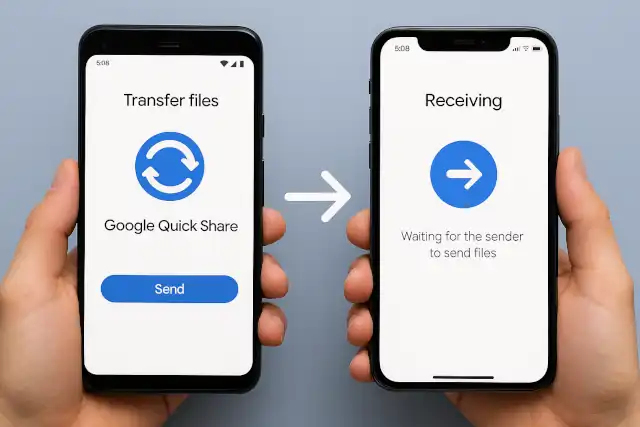
In a groundbreaking move that addresses one of the longest-standing pain points in mobile technology, Google has announced that Quick Share now works seamlessly with Apple’s AirDrop.
This development marks a significant milestone in cross-platform file sharing, eliminating the frustration that millions of users have experienced when trying to transfer files between Android and iPhone devices.
For years, sharing files across different ecosystems meant resorting to workarounds—emailing files to yourself, uploading to cloud services, or relying on third-party messaging apps. Now, with Quick Share’s integration with AirDrop, those days are finally over.
Without Clouds or Internet: End-to-End Encrypted LAN File Transfer with LocalSend
Release Timeline: When Will Quick Share Be Available?
Current Availability (November 2025)
Google officially rolled out the Quick Share-AirDrop integration on November 20, 2025. However, the initial release is limited in scope:
- Currently Available: Pixel 10 series only (Pixel 10, Pixel 10 Pro, Pixel 10 Pro XL, and Pixel 10 Fold)
- Required Update: Users must update the “Quick Share Extension” system service through Google Play Services
- Activation: The feature needs to be manually enabled through Settings → Privacy & security → System services
Expansion Plans
While Google has confirmed plans to expand Quick Share-AirDrop compatibility to additional Android devices, the company has not yet provided a specific timeline. The phased rollout suggests:
- Short term: Likely expansion to recent Pixel devices (Pixel 8 and 9 series)
- Medium term: Rollout to flagship Samsung Galaxy devices and other major Android manufacturers
- Long term: Broader Android ecosystem support, potentially reaching devices running Android 6 and later
The gradual expansion strategy allows Google to monitor performance, gather user feedback, and refine the implementation before a wider release.
Google’s 2026 Developer Verification Mandate: A New Era for Android Security
How Quick Share Works with AirDrop Between Android and iPhone
The Technical Achievement
Google accomplished something remarkable: it reverse-engineered Apple’s proprietary AirDrop protocol without direct collaboration from Apple. This represents the first successful implementation of AirDrop compatibility by a major competitor, breaking down one of the most significant barriers in mobile ecosystems.
Setting Up Cross-Platform Sharing
The process requires a few simple steps:
For iPhone Users:
- Open Settings on your iPhone, iPad, or Mac
- Navigate to AirDrop settings
- Select “Everyone for 10 Minutes” mode
- Keep the device awake and nearby
For Android Users (Pixel 10):
- Navigate to Settings → Your Google Account → All services → Privacy & security → System services
- Update “Quick Share Extension” and restart your device
- Open Quick Share from the share menu or Quick Settings
- Apple devices will appear in the list of nearby devices
Initiating Transfer:
- Android to iPhone: Select the file, choose Quick Share, and tap the iPhone from the device list. The iPhone user receives a notification and taps “Accept”
- iPhone to Android: Select the file, choose AirDrop, and tap the Android device from the list. The Android user receives a notification and accepts the transfer
How the Technology Works
Direct Peer-to-Peer Connection: The integration doesn’t use workarounds or intermediary servers. Quick Share establishes a direct, peer-to-peer connection with AirDrop using:
- Bluetooth: For initial device discovery and authentication
- Wi-Fi Direct: For high-speed file transfer
- End-to-end communication: Data never passes through external servers
File Types Supported: Users can share virtually any file type:
- Photos and videos
- Documents (PDFs, Word files, spreadsheets)
- Music and audio files
- APK files and compressed archives
- Contacts and calendar events
Transfer Speeds: Quick Share with AirDrop maintains impressive performance:
- Transfer speeds: Up to 25 MB/s for large files
- Range: Quick Share offers approximately 15 meters, compared to AirDrop’s 9-meter typical range
- Time: A 500 MB file transfers in approximately 20 seconds
Current Limitations
The “Everyone for 10 Minutes” requirement introduces some friction:
- Users must manually enable the visibility mode before each sharing session
- The 10-minute window resets automatically for privacy
- “Contacts Only” mode is not yet supported (though Google has expressed interest in collaborating with Apple to enable it)
World’s First LPDDR6 Memory Debuts: Samsung Unveils Next-Generation Solution for Android Devices
Cross-Platform Support: Windows, macOS, and Linux
Official Platform Support
Currently Supported:
- Android: Android 6.0 and later (via Google Play Services)
- Windows: Windows 10 (64-bit) and Windows 11 (including ARM versions)
- Available through the Microsoft Store
- Requires Bluetooth and Wi-Fi hardware
- ChromeOS: ChromeOS 91 and later (built-in)
- iOS/macOS: Now compatible through AirDrop integration (receive and send files)
Not Officially Supported:
- macOS (native app): Google has not released a native Quick Share application for macOS. Mac users must rely on the AirDrop integration when sharing with Android devices
- Linux: No official Quick Share client exists for Linux distributions
Workarounds for Unsupported Platforms
For macOS Users: While there’s no native Quick Share app for Mac, users have several options:
- AirDrop Integration (Recommended): Use the new Quick Share-AirDrop interoperability to share files with Android devices
- Windows Virtualization: Run Windows 11 ARM in Parallels Desktop or similar virtualization software, then install Quick Share in the virtual machine
- Third-Party Alternatives: Use RQuickShare, an unofficial open-source implementation (see below)
For Linux Users: Several community-developed solutions exist:
-
RQuickShare: A Rust implementation of Quick Share/Nearby Share for Linux and macOS
- Available as AppImage, Snap, DEB, and RPM packages
- Supports both sending and receiving files
- Active development on GitHub
-
Command-line tools: Various unofficial implementations available through package managers
The Universal Vision
Google’s stated goal is to make Quick Share a truly universal file-sharing protocol that works across all major platforms. The successful AirDrop integration represents a significant step toward this vision, potentially positioning Quick Share as the first genuinely cross-platform file transfer standard that transcends device manufacturers and operating systems.
LibrePhone Aims to Challenge Android and iOS Duopoly
Security Comparison: Quick Share vs. LocalSend
Both Quick Share and LocalSend prioritize security, but they take different approaches. Here’s a comprehensive comparison:
Quick Share Security Features
Memory Safety Through Rust: Google developed Quick Share’s AirDrop integration using the Rust programming language, which is recognized by security agencies worldwide (including the NSA and CISA) for eliminating entire classes of memory-safety vulnerabilities. Rust’s compiler enforces strict ownership rules that prevent buffer overflows, use-after-free bugs, and other common exploits.
Multi-Layered Security Approach:
-
Secure Development Process:
- Internal threat modeling
- Privacy reviews
- Red team penetration testing
-
Third-Party Validation:
- Independent security assessment by NetSPI (leading penetration testing firm)
- Assessment concluded the implementation is “notably stronger” than other industry implementations
- Expert review by Stanford professor Dan Boneh, a renowned security expert
-
Peer-to-Peer Architecture:
- Direct device-to-device connection
- No cloud servers involved
- Shared content is never logged
- No extra data is transmitted beyond the intended files
-
Privacy Protection:
- Device discovery requires explicit visibility settings
- Users can confirm recipient device name before transfer
- Time-limited visibility modes (10 minutes for “Everyone” mode)
Potential Concerns:
- Closed-source implementation (not publicly auditable)
- “Everyone for 10 Minutes” mode could expose devices to nearby strangers in public spaces
- Relies on Google Play Services on Android
LocalSend Security Features
End-to-End Encryption: LocalSend uses TLS (Transport Layer Security) encryption for all file transfers, ensuring data confidentiality and integrity during transmission.
Complete Privacy:
-
Zero Cloud Dependency:
- All transfers occur directly between devices on the local network
- No data ever leaves the local network
- No risk of cloud provider breaches or third-party interception
-
Open Source Transparency:
- Complete source code available on GitHub
- Community-auditable implementation
- No hidden backdoors or tracking mechanisms
-
No Data Collection:
- No tracking
- No analytics
- No advertising
- No account creation required
-
Dynamic Security:
- TLS/SSL certificates generated dynamically on each device
- Unique encryption keys for every session
Use in Security-Sensitive Environments: LocalSend is deployed in:
- Defense organizations
- Critical infrastructure facilities
- Secure corporate environments
- Government agencies
Security Comparison Summary
| Feature | Quick Share | LocalSend |
|---|---|---|
| Encryption | TLS/SSL for peer-to-peer transfer | End-to-end TLS encryption |
| Open Source | No | Yes |
| Data Collection | Minimal (Google Play Services) | None |
| Cloud Dependency | None for transfers | None |
| Memory Safety | Rust implementation | N/A (open to audit) |
| Third-Party Audit | Yes (NetSPI) | Community review |
| Public Network Risk | Moderate (“Everyone” mode) | Low (local network only) |
| Auditability | Limited (closed source) | Full (open source) |
Which Is More Secure?
LocalSend likely offers stronger privacy guarantees for users who prioritize:
- Complete transparency and auditability
- Zero data collection
- Independence from large technology companies
- Use in high-security environments
Quick Share provides robust security with the advantages of:
- Professional third-party security audits
- Memory-safe implementation (Rust)
- Backing by Google’s security infrastructure
- Wider platform compatibility
Practical Recommendations
Choose LocalSend if you:
- Need verifiable security through open-source code
- Work in security-sensitive industries
- Want complete independence from corporate ecosystems
- Prioritize privacy above all else
Choose Quick Share if you:
- Need seamless integration with the Android ecosystem
- Want to share files with iPhone users
- Prefer convenience over complete transparency
- Trust professionally-audited, closed-source implementations
For Maximum Security in Either Case:
- Only share on trusted networks (home or secure office Wi-Fi)
- Avoid public Wi-Fi networks for file transfers
- Verify recipient device names before accepting transfers
- Keep software updated to the latest versions
Has Your iPhone or Android Phone Been Hacked?
Conclusion
Google’s Quick Share integration with Apple’s AirDrop represents a watershed moment in cross-platform compatibility. By successfully reverse-engineering AirDrop without Apple’s direct involvement, Google has demonstrated that interoperability is achievable even within traditionally closed ecosystems.
While currently limited to the Pixel 10 series, the feature’s expansion to more Android devices is inevitable. The implementation combines robust security measures with user-friendly design, making cross-platform file sharing finally feel seamless.
When compared to alternatives like LocalSend, Quick Share offers different trade-offs: professional backing and wider compatibility versus complete open-source transparency and zero data collection. Users can choose based on their priorities, but for most everyday file-sharing needs between Android and iPhone, Quick Share with AirDrop integration eliminates long-standing frustrations.
As Google continues to refine the feature and potentially collaborate with Apple to enable “Contacts Only” mode, we may be witnessing the beginning of a new era of true cross-platform compatibility in mobile technology—one where the device you choose doesn’t limit your ability to connect with others.
Note: This article is based on information available as of November 20, 2025. Features, availability, and security implementations may change as Google continues to develop and expand Quick Share.